IT, Cloud & Cybersecurity • Certification
Microsoft Certified: Azure Fundamentals
The entry-level Azure credential that proves you understand cloud and Azure fundamentals — no experience required.
Researched and maintained by TestPrepPilot Editorial BoardCloud, IT & cybersecurity certifications desk · Figures last verified August 2026
The short version
What is the Microsoft Certified: Azure Fundamentals and is it worth it?
AZ-900 is a Fundamentals-level exam covering cloud concepts, Azure architecture and services, and Azure management and governance. It costs $99, lasts about 45 minutes, and requires a scaled score of 700/1000 to pass. No prior experience is needed, and the credential renews yearly with a free online assessment.
- Beginner-friendly: no Azure experience or coding required
- Low cost ($99) and short format (about 45 minutes)
- May earn ACE college credit when you pass
- A clear, official on-ramp to AZ-104 and other role-based certs
- Renews for free every 12 months via Microsoft Learn
What is it?
What exactly is the Microsoft Certified: Azure Fundamentals?
The entry-level Azure credential that proves you understand cloud and Azure fundamentals — no experience required.
Microsoft Certified: Azure Fundamentals (AZ-900) is Microsoft's beginner certification for cloud and Azure. It validates conceptual knowledge of cloud computing models, core Azure architectural components (compute, networking, storage, and databases), and the management and governance tooling that keeps Azure secure and organized. AZ-900 is designed for candidates who are new to cloud or starting a Microsoft certification path, including students, business stakeholders, and IT professionals moving into cloud roles. It is not a prerequisite for the associate exams, but it is the most common on-ramp and is accepted for ACE college credit. Employers use it to confirm a baseline understanding of Azure before deeper role-based training.
The path in brief
- Confirm AZ-900 fits your goal (cloud fundamentals)
- Study the free Microsoft Learn Azure Fundamentals paths
- Take the official practice assessment
- Schedule the $99 exam via Pearson VUE
- Pass with 700/1000 and renew yearly for free
Before you book
Who is eligible to sit the Microsoft Certified: Azure Fundamentals?
Open to all. Anyone may register and sit AZ-900; there are no eligibility restrictions, and students can schedule through Certiport.
Who it is for: Students, career changers, business stakeholders, and IT pros starting with cloud.
The test itself
What is the format of the Microsoft Certified: Azure Fundamentals?
The Microsoft Certified: Azure Fundamentals is administered by Pearson VUE (students and educators via Certiport) and runs 45 minutes, contains 40–60 (includes unscored preview items) questions and requires 700 / 1000 (scaled) to pass.
| Administered by | Pearson VUE (students and educators via Certiport) |
|---|---|
| Questions | 40–60 (includes unscored preview items) |
| Time limit | 45 minutes |
| Pass mark | 700 / 1000 (scaled) |
| Exam fee | $99 USD |
| Format | Computer-based, multiple-choice and other auto-graded item types |
Content outline
What topics are on the Microsoft Certified: Azure Fundamentals?
The Microsoft Certified: Azure Fundamentals is weighted across 3 domains; the largest are Describe Azure architecture and services (35–40%), Describe Azure management and governance (30–35%), Describe cloud concepts (25–30%).
Weightings come from the official exam outline. Study time is best allocated in roughly these proportions rather than evenly across domains.
- Describe cloud concepts 25–30%
Cloud computing models (IaaS, PaaS, SaaS), public/private/hybrid cloud, capex vs opex, and the shared responsibility model.
- Describe Azure architecture and services 35–40%
Azure regions, availability zones, resource groups, plus core compute, networking, storage, and database services.
- Describe Azure management and governance 30–35%
Microsoft Entra ID, Azure Policy, role-based access control, cost management, and compliance tooling.
The path
How do you register for the Microsoft Certified: Azure Fundamentals?
- 1
Prepare with Microsoft Learn1–10 weeks depending on exam and experience
Work through the free official self-paced learning paths and, optionally, instructor-led courses for your exam. Microsoft Learn is the primary, no-cost study source and maps directly to the exam skills outline.
- 2
Schedule through Pearson VUEabout 15 minutes
Sign in with a personal Microsoft account (MSA) and schedule the exam on the Pearson VUE portal. Choose an in-person test center or online proctoring (OnVUE). Students and educators can use Certiport for Fundamentals exams.
Microsoft recommends a personal MSA account; a work or school account can lose exam records if you leave the organization.
- 3
Take the exam45–120 minutes depending on the exam
Arrive at the test center or launch the online proctoring session. Exams are computer-based and may include multiple-choice, drag-and-drop, case studies, and performance-based lab tasks in a live environment.
- 4
Receive results and badgescore at end; badge within a few days
You see a pass/fail result on screen immediately. A detailed score report is emailed within about 24 hours and posted to your Microsoft certification profile. On passing, your digital badge is issued via Credly.
- 5
Renew annuallyabout 45 minutes, once a year
Most Microsoft role-based, specialty, and fundamentals certifications expire after 12 months. Renew for free by passing a shorter online renewal assessment on Microsoft Learn before the expiry date — no need to retake the full exam.
The fine print
What are the retake and renewal rules for the Microsoft Certified: Azure Fundamentals?
- Proctoring & delivery
- Delivered by Pearson VUE. You can sit the exam at a Pearson VUE test center or take it online through OnVUE remote proctoring; the fee is the same for both. Online proctoring requires a quiet, private space, a working webcam, and a system check beforehand.
- Retake policy
- If you do not pass, you may retake the exam after 24 hours. A second failed attempt requires a 14-day waiting period, and any further attempts also require a 14-day wait between them, up to a maximum of five attempts in a 12-month period.
- Score reporting
- A pass/fail result is shown immediately after the exam. The official score report is emailed within about 24 hours and is also available in your Microsoft certification profile, with section-level feedback on how you performed.
- Recertification
- Microsoft role-based, specialty, and fundamentals certifications are valid for 12 months from the date earned. Renew at no cost by passing the shorter online renewal assessment on Microsoft Learn before the credential expires. Retired certifications cannot be renewed and must be re-earned through the active successor if one exists.
- Refunds & rescheduling
- Exam fees are generally non-refundable once a seat is purchased, but you can cancel or reschedule through Pearson VUE at no charge if you do so at least 24–48 hours before the appointment (exact window varies by region).
Context
Microsoft Azure / AI certifications compared
| Credential | Level | Focus | Exam fee | Validity | |
|---|---|---|---|---|---|
| AZ-900 Azure Fundamentals | Fundamentals | Cloud concepts | $99 | 1 year | |
| AI-900 Azure AI Fundamentals | Fundamentals | AI concepts | $99 | 1 year (retired Jun 30 2026) | |
| AI-901 Azure AI Fundamentals | Fundamentals | AI + Microsoft Foundry | $99 | 1 year | |
| AZ-104 Azure Administrator | Associate | Administer Azure | $165 | 1 year | |
| AZ-204 Azure Developer | Associate | Build cloud apps | $165 | 1 year (retired 2026) | |
| AZ-500 Azure Security Engineer | Associate | Security operations | $165 | 1 year (retires Aug 31 2026) | |
| AZ-700 Azure Network Engineer | Associate | Networking | $165 | 1 year | |
| AZ-140 Azure Virtual Desktop | Specialty | Virtual desktop (AVD) | $165 | 1 year | |
| AZ-305 Azure Solutions Architect | Expert | Solution design | $165 | 1 year |
What it pays
How much does this credential pay?
No standalone salary premium — AZ-900 is a door-opener, not a pay bump
Be sceptical of anyone who quotes you an "AZ-900 salary". There isn't one, and the honest framing matters more here than on any other exam in the Azure family. AZ-900 is a fundamentals credential with no prerequisite and no hands-on component; it certifies that you can describe cloud concepts, name Azure services, and explain how governance and cost management work. Employers read it as evidence of intent and baseline literacy, not as proof you can operate a subscription. Nobody is hired as an Azure administrator on the strength of AZ-900 alone. Where it genuinely earns its keep is in three places. First, career changers and help-desk staff use it to get past resume screens into junior cloud-adjacent roles, and the closest honest BLS occupation for that population is Computer Support Specialists — we cite the network support sub-occupation (SOC 15-1231) because Azure-adjacent support work maps there better than generic user support (15-1232). Second, non-technical staff in Microsoft partner organisations — presales, delivery management, procurement — are frequently required to hold it, and there it functions as a job condition rather than a raise. Third, it is the standard warm-up before AZ-104, which is where the actual money starts. The BLS figures below describe the occupation someone with only AZ-900 might realistically enter, and that occupation is projected to shrink. That is not an argument against the exam; it is an argument for treating it as week one of a longer plan rather than the destination.
| Measure | Figure | Source / note |
|---|---|---|
| Median wage — computer network support specialists (SOC 15-1231) | $73,340 | BLS Occupational Outlook Handbook, wage data for May 2024 (latest release). Closest honest match for Azure-adjacent junior support roles. |
| Median wage — computer user support specialists (SOC 15-1232) | $60,340 | BLS OOH, May 2024. The generic help-desk baseline many AZ-900 holders are moving out of. |
| Employment, computer support specialists (2024) | 882,300 jobs | BLS OOH, 2024 base-year employment. |
| Projected openings per year, 2024-2034 | ~50,500 | BLS OOH. All openings come from replacement need, not growth. |
| Self-reported average, Microsoft Certified: Azure Fundamentals holders | $82,457 | Skillsoft "30+ Top-Paying Microsoft Certifications" (2025), drawn from its IT Skills and Salary survey — worldwide, self-reported respondent data, NOT government statistics. Respondents typically hold several certifications and years of experience, so this reflects the person, not the credential. |
Job growth.-3% projected change 2024-2034 for computer support specialists (decline) — BLS OOH
Source: BLS Occupational Outlook Handbook — Computer Support Specialists
Your odds
What are the pass rates?
Microsoft publishes no pass rate for AZ-900 — and never has
Every "AZ-900 has an 85% pass rate" figure on the internet traces back to a company selling a course. Microsoft does not publish pass rates for any certification exam, has never done so, and does not release attempt counts, first-time pass percentages, or score distributions. We are not going to launder a bootcamp's marketing claim into a data table here, because the number would be indistinguishable from one we made up. What Microsoft does publish is far more useful for planning, and AZ-900 candidates in particular tend to misread it. The exam is scored on a scale of 1 to 1,000 with 700 required to pass, and Microsoft states explicitly that this is a scaled score which "may not equal 70% of the points". Scaling exists because different candidates see different question sets of differing difficulty: an easier set requires more raw points to clear 700, a harder set requires fewer. You cannot count your way to a pass. There is also no penalty for guessing, so leaving a question blank is strictly worse than a coin flip, and an unknown subset of items on your form is unscored pilot content that still must be answered as though it counts. When you finish you get a preliminary pass/fail on screen within minutes, plus a score report containing one overall numeric score and a bar chart showing relative strength across the three skill areas. Microsoft is clear that the bars cannot be added up or converted into a percentage — a candidate can see bars that all look above 70% and still have failed, because the sections contain different numbers of questions.
Read this before quoting the number.No official pass rate exists. Any percentage you see quoted for AZ-900 comes from a course vendor, a survey of self-selecting forum users, or an outright guess — none of which Microsoft has validated. Plan against the published mechanics instead: 700/1000 scaled (not 70%), a score report that shows relative strength by skill area rather than a mark scheme, and a retake policy that costs you the full fee again. If you fail, you must wait 24 hours before the second attempt; a 14-day wait applies between every attempt after that, up to a maximum of five attempts in the 12 months following your first sitting. At $99 per attempt, three attempts costs more than a single associate-level exam. Verified against the Microsoft exam retake policy and exam scoring pages, 2026-08-04.
Your schedule
How long should I study for it?
20-35 hours total of focused study
AZ-900 is the one exam in this family that genuinely is passable in two to three weeks from a standing start, and the plan below assumes exactly that: no prior Azure exposure, no certification history, and evenings only. The reason it compresses so well is that nothing on the July 2026 blueprint requires you to build anything. Every objective verb is "describe", "define", "compare" or "identify" — there is not a single "configure" or "deploy" on the outline. That is a real structural difference from AZ-104, and it changes how you should study: reading and recall beat lab time here, which is the opposite of the advice you will correctly receive for every associate exam. The blueprint weights are lopsided enough to plan around. Azure architecture and services carries 35-40%, management and governance 30-35%, and cloud concepts only 25-30%. Most beginners over-invest in the first week's conceptual material — IaaS versus PaaS versus SaaS, the shared responsibility model, CapEx versus OpEx — because it feels like the foundation, then run out of runway on the service-naming and governance material that is actually worth more marks. Front-load the middle domain. A free Azure account is still worth creating even though the exam will not test your clicks: seeing a resource group, a storage account and the Pricing Calculator with your own eyes converts a list of names into something you can picture, and that is the difference between recognising "Azure Arc" and being able to say what it is for.
- Week 18-12 hrs
Cloud concepts (25-30%) + create a free account
- Work the Microsoft Learn "Describe cloud concepts" modules end to end — they map 1:1 to the first blueprint domain
- Create a free Azure account and simply look around the portal for an hour; do not try to build anything
- Write your own one-line definitions of IaaS, PaaS, SaaS, public/private/hybrid, and serverless, then check them against the docs
- Nail the shared responsibility model as a table: who patches the OS under IaaS vs PaaS vs SaaS is a near-certain question shape
- Week 210-14 hrs
Azure architecture and services (35-40%) — the heaviest domain
- Learn the hierarchy cold: management groups → subscriptions → resource groups → resources, and which scope inherits what
- Distinguish regions, region pairs, availability zones and datacentres — these four are routinely confused with each other on practice questions
- Build a comparison sheet for compute (VMs, Virtual Machine Scale Sets, containers, Azure Container Instances, Functions, App Service) and for storage tiers and redundancy options (LRS/ZRS/GRS/GZRS)
- Cover the identity block added weight in recent updates: Microsoft Entra ID, Entra Domain Services, SSO, MFA, passwordless, Conditional Access, Azure RBAC, Zero Trust, defence in depth
- Week 38-12 hrs
Management and governance (30-35%) + the free practice assessment
- Separate the four governance tools by purpose: Azure Policy (enforce rules), resource locks (prevent deletion/change), RBAC (who can do what), tags (organise and attribute cost)
- Open the Azure Pricing Calculator and the TCO tooling yourself; the exam asks what each is for, and using them once fixes it
- Learn the monitoring trio — Azure Advisor (recommendations), Azure Service Health (Microsoft-side outages), Azure Monitor including Log Analytics and Application Insights (your telemetry)
- Take the free official Practice Assessment on Microsoft Learn at least twice, and review every wrong answer against the docs rather than the answer key
- Confirm the study guide still reads "Skills measured as of July 20, 2026" the week you sit — if the date has moved, read the change log before you book
Adjusting the pace
Already work in IT.If you administer Windows Server, VMware or an on-prem network today, compress to 10-14 days. Your gap is almost entirely Azure-specific service names and the governance domain, not the cloud concepts you already live with.
Completely non-technical.Give it four to five weeks at five hours a week. Add a plain-English glossary pass in week one — much of the perceived difficulty for business-side candidates is vocabulary, not concept.
Sitting AZ-104 next.Do not stretch AZ-900. Take it fast, then start AZ-104 immediately while the service names are warm. Note that AZ-900 is not a prerequisite for AZ-104 and you may reasonably skip it entirely if you already have IT experience.
How to study
How do I prepare most effectively?
The single most useful thing to internalise about AZ-900 is that it rewards breadth of recognition over depth of skill. You are being asked to identify the right Azure service for a described need, not to configure it. That inverts most of the study advice written for the associate exams, and candidates who arrive from a hands-on background often over-prepare wildly — spending three weeks in the portal for an exam that never asks them to touch it — while career changers under-prepare on the sheer volume of product names. Calibrate to the verbs on the blueprint.
Study the verbs, not just the topics
Every objective on the July 2026 outline begins with describe, define, compare or identify. Not one says configure, deploy or troubleshoot. When you find yourself learning the exact steps to create a storage account, stop — that is AZ-104 material. The right depth for AZ-900 is being able to say what a storage account is, which redundancy options exist, and when you would choose cool over hot tier.
Build a service-to-problem lookup table
The dominant question shape is a one-sentence business need followed by four Azure service names. Make a two-column sheet: left side a plain-English need ("see recommendations to cut my bill", "know if a Microsoft region is down", "stop anyone deleting this resource group"), right side the service (Azure Advisor, Azure Service Health, resource lock). Roughly forty rows covers the exam. Drill it as flashcards rather than reading it.
Get the four governance tools straight early
Azure Policy, RBAC, resource locks and tags are constantly swapped as distractors and they are conceptually adjacent enough that they blur. Fix them by the question each answers: Policy asks "is this resource allowed to exist in this shape?"; RBAC asks "is this person allowed to do this?"; a lock asks "can this be deleted or modified at all?"; a tag asks nothing — it is metadata for cost attribution and organisation.
Use the free official Practice Assessment as a diagnostic, not a rehearsal
Microsoft publishes a free Practice Assessment for AZ-900 on Learn. Its value is telling you which of the three domains is weakest, not predicting your score. Take it once early to triage, then again at the end. Ignore anyone marketing a "pass guarantee" bank of hundreds of questions — for a $99 conceptual exam the free assessment plus the docs is genuinely sufficient.
Do not skip the pricing and cost material
Cost management sits inside the 30-35% governance domain and is the topic technical candidates most often wave away as "the finance bit". The exam asks about factors affecting cost, the consumption-based model, the Pricing Calculator, Cost Management capabilities, and the purpose of tags for chargeback. It is easy marks and it is a meaningful share of the paper.
Plan for a closed-book room
Associate and expert role-based exams give you a split-screen Microsoft Learn panel during the exam. Fundamentals exams do not — Microsoft states the resource is unavailable on Fundamentals and GitHub exams. AZ-900 is entirely from memory, so do not build a study strategy that assumes you can look up a service name on the day.
Check the change log before you book
The AZ-900 blueprint was last revised on 20 July 2026, with minor changes to the compute and networking, deployment tooling, and monitoring objectives. Microsoft always updates the English version first and localised versions roughly eight weeks later. Open the study guide's change log the week you book; a course you bought six months ago may predate the current outline.
What to buy
Which study resources are worth paying for?
AZ-900 is the exam where paying for training is hardest to justify. The official Microsoft Learn path plus the free practice assessment covers the entire blueprint, and the exam does not require lab time you would need a subscription for. We list the paid options because plenty of people learn better with video structure — but the free column genuinely is sufficient here, which is not something we would say about AZ-104 or AZ-305.
| Resource | Price | Format | Best for |
|---|---|---|---|
| Microsoft Learn AZ-900 path (official) | Free | Self-paced text modules + knowledge checks | The complete blueprint. Start and, for many candidates, finish here. |
| Microsoft official Practice Assessment | Free | Timed online question bank on Microsoft Learn | Diagnosing which of the three domains is weak before you book. |
| John Savill's Technical Training — AZ-900 study cram (YouTube) | Free | Long-form video whiteboarding | The best free video resource for Azure certifications, full stop. Savill is a Microsoft MVP and his whiteboard diagrams do more for the architecture domain than any paid course we have seen. |
| Microsoft Virtual Training Day — Azure Fundamentals | Free (often includes an exam voucher) | Live instructor-led online session | Getting the $99 fee covered entirely. Microsoft runs these regularly; attendees frequently receive a free-exam voucher. |
| Adam Marczak — Azure for Everyone (YouTube) | Free | Short topic videos | Visual learners who want one service explained cleanly at a time. |
| Scott Duffy AZ-900 (Udemy) | ~$15-30 on sale, $90+ list | Video course + quizzes | Candidates who want a single structured narrative and will not stick with self-paced text. |
| MeasureUp AZ-900 practice test (official Microsoft practice partner) | $99 list, discounted to ~$54 | Practice test in test and study modes | Hard to justify at list price for a $99 exam. Only worth it if you have already failed once. |
| Whizlabs AZ-900 practice tests | ~$20-25 | Question bank | A cheap second opinion if the free assessment is not enough repetition. |
| Pluralsight / A Cloud Guru | ~$29-45/month | Video library + hands-on sandboxes | Only sensible if you already hold a subscription or intend to continue straight to AZ-104, where the sandboxes actually matter. |
| Microsoft Applied Skills | Free | Scenario-based online lab assessments | Not an AZ-900 substitute — there is no fundamentals-level Applied Skills equivalent — but a good free way to prove hands-on ability alongside the cert. |
Prices checked 2026-08-04 and are USD list prices before regional adjustment, sales or student discounts. We take no commission from any provider listed and the ordering reflects our editorial view of usefulness, not any commercial relationship.
Avoid these
What mistakes do candidates most often make?
Most AZ-900 failures are not knowledge failures — the blueprint is genuinely shallow. They are planning and expectation failures: people misread the score, study the wrong version of the outline, or arrive expecting a different exam than the one Microsoft wrote.
✕Believing 700/1000 means you need 70% of the questions right
✓It does not. Microsoft states plainly that the score is scaled and "may not equal 70% of the points". Different candidates get question sets of differing difficulty; an easier set demands more raw points to reach 700, a harder one demands fewer. Stop calculating how many you can afford to miss — there is no fixed answer — and note that some items on your form are unscored pilot questions anyway.
✕Studying a course recorded before the 20 July 2026 blueprint update
✓Open the study guide's change log before you buy anything. The current outline is dated 20 July 2026 and revised the compute and networking, deployment tooling and monitoring objectives. A well-reviewed Udemy course from 2024 can be substantially out of date on service naming alone — Azure Active Directory became Microsoft Entra ID, and older material still uses the old name throughout.
✕Assuming AZ-900 is a prerequisite for AZ-104, AZ-305 or anything else
✓It is not a prerequisite for any Microsoft certification. Microsoft says so directly. If you already work in IT, you are entitled to book AZ-104 tomorrow without ever sitting AZ-900, and many experienced admins should. Treat AZ-900 as optional scaffolding for beginners, not as a gate.
✕Preparing as though it is a hands-on exam
✓Every blueprint verb is descriptive. There are no labs on AZ-900 and no configuration questions. Spending three weeks building VNets is time you should have spent memorising which service does what. Create a free account, look around for an hour so the vocabulary has pictures attached, and then go back to the reading.
✕Expecting to look things up during the exam
✓Microsoft's in-exam Microsoft Learn panel is available on associate and expert role-based exams only; it is explicitly unavailable on Fundamentals exams. AZ-900 is closed-book. Plan for pure recall, and note that even on the exams where the panel exists, the timer keeps running while you read.
✕Assuming the certification will expire and needs renewing
✓It will not. Microsoft states that Fundamentals certifications do not expire. Only associate, expert and specialty certifications lapse annually and need the free renewal assessment. Once you pass AZ-900 it is yours permanently — which also means you should not treat it as a currency signal on a resume five years later.
✕Misreading the score report bar chart after a fail
✓The report shows one overall numeric score plus a bar chart of relative strength per skill area. Microsoft states the bars cannot be combined to calculate your result, because each section has a different number of questions. Candidates regularly post "all my bars were above 70% but I failed" — that is expected behaviour, not an error. Use the shortest bar to direct your revision and nothing more.
What you'll face
What question types will I see?
AZ-900 uses the standard Microsoft item formats but a narrower slice of them than the associate exams. Microsoft's published list of formats across its certification programme covers multiple choice, multiple response, drag and drop, hot area, build list, active screen, mark review and review screen, plus case studies and interactive labs — but case studies and labs belong to the role-based exams, not to Fundamentals. Expect predominantly multiple choice and multiple response, with a meaningful minority of drag-and-drop matching and hot-area items, plus the recurring Microsoft signature format: a three-part statement block where each row must be independently judged true or false, or a sentence with two or three dropdowns to complete. Those partial-credit formats matter more than candidates expect. Microsoft confirms you earn one point per correctly answered component of a multi-part question, so you can bank partial credit on a drag-and-drop even if you misplace one item — never leave one blank because you are unsure of a single row. There is no penalty for guessing anywhere on the exam. Two navigation realities are worth knowing. AZ-900 is a 45-minute exam with a 65-minute seat time, and you can mark questions for review and return to them via the review screen at the end. However, if you start an unscheduled break through the exam UI, Microsoft warns that you cannot return to any question you have already seen — including ones you marked for review. On a 45-minute paper there is essentially no reason to take a break, but candidates occasionally trigger one by accident and lose their marked items. Finally, remember AZ-900 is closed-book: the in-exam Microsoft Learn panel is not offered on Fundamentals exams.
One correct option out of four or five. Typically a one- or two-sentence scenario followed by a service selection. Distractors are usually adjacent Azure services rather than nonsense, so partial recognition is not enough.
The stem tells you how many to select and the option count is enforced. Frequently used for "which two are benefits of..." or "which three are valid redundancy options". Usually all-or-nothing rather than partial credit unless the question states otherwise.
Match services to descriptions, or place items into the correct tier of the management group → subscription → resource group hierarchy. Scored per correct placement, so always fill every slot.
A rendered screenshot or diagram where you click the correct region, or a set of dropdowns embedded in a statement. Scored per correct selection.
Three related statements about one scenario, each judged independently. A Microsoft staple and a reliable source of partial credit — judge each row on its own merits rather than assuming a pattern.
Place steps or scopes in the correct sequence. Appears far less often here than on the associate exams because AZ-900 has no procedural objectives.
Multi-question scenario blocks with tabbed background documents are a feature of the associate and expert role-based exams (AZ-104, AZ-305 and their siblings). They do not appear on Fundamentals exams.
Live Azure environments appear only on certain role-based exams. AZ-900 has none, which is why the seat time is 65 minutes rather than 140.
Try these
Q1A company deploys a line-of-business application onto Azure virtual machines that it manages itself. Under the Azure shared responsibility model, who is responsible for applying operating system security patches to those virtual machines?
Answer:B
Azure virtual machines are infrastructure as a service, and under IaaS the customer retains responsibility for everything from the guest operating system upwards — OS patching, application configuration, and identity within the workload. Microsoft's responsibility stops at the physical hosts, the hypervisor, the datacentre and the network fabric. Option A is the tempting one because people generalise from SaaS, where Microsoft does patch the underlying platform; the whole point of the shared responsibility model is that the line moves depending on service type. Option C invents a distinction that does not exist — the guest OS is the customer's regardless of which OS it runs. This mapping of responsibility against IaaS, PaaS and SaaS is one of the most reliably examined ideas in the cloud concepts domain (25-30%).
Q2An organisation must guarantee that a critical workload survives the failure of an entire physical datacentre while remaining within a single Azure region and keeping latency low. Which Azure feature should be recommended?
Answer:B
Availability zones are physically separate datacentre facilities within a single Azure region, each with independent power, cooling and networking, connected by high-speed low-latency links. Distributing a workload across zones is exactly the answer to "survive a datacentre failure, stay in one region, keep latency low". Region pairs (A) are the distractor most candidates fall for: they do provide resilience, but they pair two separate regions typically hundreds of miles apart, which fails the "single region" and "low latency" constraints in the stem. Management groups (C) and resource groups (D) are organisational and governance containers with no bearing on physical resilience at all, and they appear here because the exam frequently mixes hierarchy concepts into availability questions to see whether you can tell structure from resilience. This sits in the Azure architecture and services domain (35-40%).
Q3A governance team needs to prevent anyone in the organisation from creating Azure resources in regions outside the European Union, and wants the restriction enforced automatically at the point of deployment. Which Azure capability meets this requirement?
Answer:C
Azure Policy evaluates resources against defined rules and can deny a deployment that violates them — restricting permitted regions is one of Microsoft's own built-in policy definitions and the canonical example of the service. RBAC (A) is the strongest distractor and the one most candidates choose, but RBAC governs who may perform an action, not what shape the resulting resource may take; a user with Contributor rights could still deploy to the wrong region. A resource lock (B) prevents deletion or modification of something that already exists and cannot stop a creation. Tags (D) are metadata for organisation and cost attribution and enforce nothing on their own. Keeping these four apart is the highest-yield distinction in the management and governance domain (30-35%).
Samples are editor-written illustrations of the published blueprint, not live exam items.
The big day
What should I expect on exam day?
AZ-900 is delivered by Pearson VUE either at a physical test centre or online through OnVUE, and the choice matters more than most first-timers assume. A test centre removes every environmental variable — the machine works, the room passes, and nobody walks in — at the cost of travel. OnVUE lets you sit at your own desk but puts the burden of compliance entirely on you, and the check-in is stricter than people expect. Because AZ-900 is only 45 minutes of exam time inside a 65-minute seat, the check-in can genuinely take longer than the paper itself. For OnVUE, plan to launch the check-in 30 minutes before your appointment. You photograph yourself, both sides of your ID, and your workspace from four angles using a phone; Pearson VUE uses facial-comparison technology to match you against your ID, and consenting to that is a condition of sitting online. Your desk must be clear. Microsoft's guidance is explicit that books, notepads, sticky notes, printed material and all writing implements — pens, pencils, markers, whiteboard markers — must be out of arm's reach, and no second monitor may be connected. There is no scratch paper of any kind on OnVUE and no physical whiteboard: candidates who have read that Pearson VUE permits an erasable whiteboard in a sleeve are thinking of other vendors' policies, and Microsoft's own online-exam guidance permits neither. Roll up long sleeves, empty your pockets, tie back long hair and remove watches and headphones; the greeter may ask you to demonstrate all of this on camera. You may keep a drink in a clear, sealed container. Your phone stays in the room but out of reach, audible, in case the proctor needs to call you. On a 45-minute exam you should not take a break at all — and if you start one through the exam UI, you lose access to every question you have already seen, including any you flagged for review.
Bring
- One current, valid, government-issued photo ID whose name matches your Microsoft certification profile exactly — no nicknames, no middle-name mismatches
- A second form of ID if your primary one lacks a signature (check Pearson VUE ID requirements for your country before the day)
- A phone for the OnVUE check-in photos — you need it to capture your headshot, ID and room, then it goes out of reach
- The correct country code on the mobile number in your certification profile so the proctor can reach you
- A drink in a clear, sealed, leak-proof container if you want one
- For a test centre: nothing else. Everything you arrive with goes in a locker.
Leave at home
- All notes, books, printouts and sticky notes — and for OnVUE, everything must be out of arm’s reach, not merely closed
- Every writing implement — pens, pencils, markers and whiteboard markers are all prohibited on OnVUE
- Scratch paper and physical whiteboards: Microsoft permits neither for online-proctored exams, despite what other vendors allow
- Second monitors — unplug and turn them away before check-in, and shut down any other computers in the room
- Watches, smartwatches, fitness bands, hats and head coverings (excluding religious dress), bags, coats and wallets
- Headphones and earbuds of any kind, including Bluetooth
- Any AI assistant, browser tab or second device — Microsoft explicitly prohibits AI tool assistance and another person helping or viewing your screen
How the day runs
Rules in the room
- The passing score is 700 on a 1-1,000 scale and is scaled, not a percentage — Microsoft states it may not equal 70% of the points available
- No penalty for guessing: answer every single item, including any you suspect is unscored pilot content
- Multi-part questions award one point per correct component, so complete every row of a drag-and-drop or statement block
- The in-exam Microsoft Learn panel is NOT available on Fundamentals exams — AZ-900 is closed-book
- You may flag questions and return to them via the review screen, but starting an unscheduled break locks you out of every question already seen
- Recording, transcribing or sharing exam content voids your result and can bar you from the certification programme
- The session is audio and video recorded throughout on OnVUE, and Pearson VUE may use automated analysis to flag anomalies for human review
Afterwards.You get a preliminary pass/fail on screen within minutes of submitting, and because AZ-900 has no labs there is no scoring delay. The full score report — one overall numeric score, your pass/fail status, and a bar chart of relative performance across the three skill areas — is available through your Microsoft Learn profile under Past exams, or directly on the Pearson VUE dashboard, and appears within 24 hours. Read the bar chart carefully if you failed: Microsoft is explicit that the bars cannot be summed or converted to a percentage, because each skill area contains a different number of questions, and that a candidate can score zero in a section that only carried two or three items. Microsoft will not tell you which specific questions you got wrong, by design. Use the shortest bar to target revision, then note the retake rules — 24 hours before your second attempt, 14 days between every attempt after that, five attempts maximum in the 12 months from your first sitting, and the full $99 payable each time. If you passed, the certification lands in your Learn profile and your Credly badge follows shortly. There is nothing further to do: Microsoft Certified: Azure Fundamentals does not expire, so there is no renewal assessment and no annual deadline to miss.
Reference
What are the key facts about the Microsoft Certified: Azure Fundamentals?
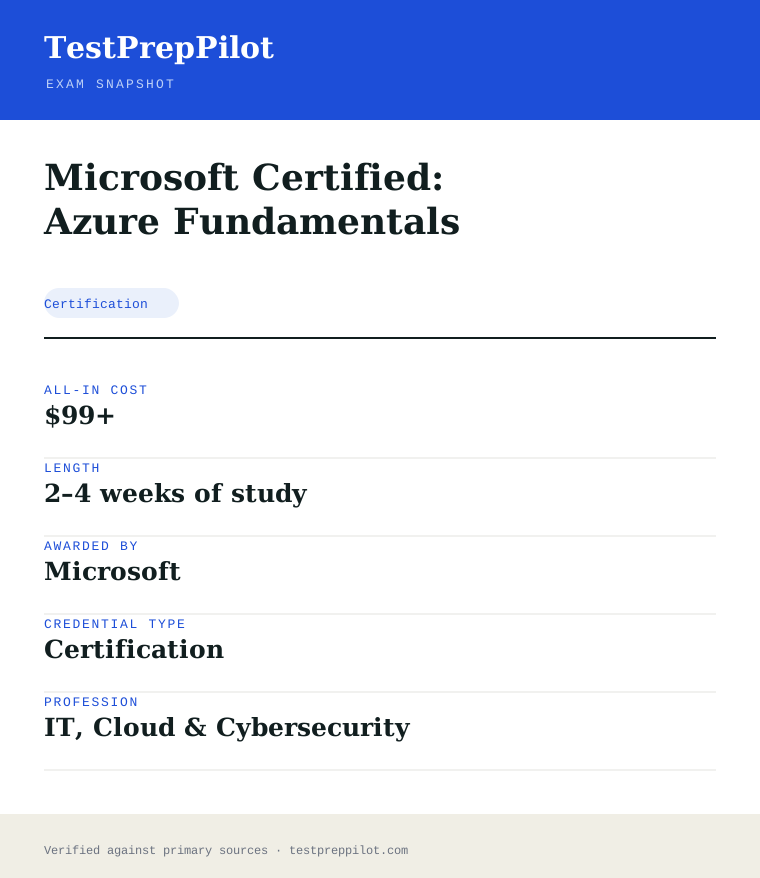
Microsoft Certified: Azure Fundamentals is a certification credential; awarded by Microsoft; the exam fee is $99 USD; typical preparation is 2–4 weeks of study; holders typically earn $60,000 – $95,000.
| Credential | Microsoft Certified: Azure Fundamentals |
|---|---|
| Abbreviation | AZ-900 |
| Type | Certification |
| Profession | IT, Cloud & Cybersecurity |
| Specialty | Microsoft |
| Awarded by | Microsoft |
| Difficulty | Easy |
| Typical prep time | 2–4 weeks of study |
| All-in cost | $99+ |
| Typical salary range | $60,000 – $95,000 |
| Credential | Microsoft Certified: Azure Fundamentals |
| Exam code | AZ-900 |
| Level | Fundamentals (beginner) |
| Exam length | 40–60 questions · 45 minutes |
| Passing score | 700 / 1000 |
| Exam fee | $99 USD |
| Delivery | Pearson VUE test center or online proctoring |
| Validity | 12 months (free annual renewal) |
| Scope | National / Multi-state |
| Also known as | AZ-900 |
Real questions
Frequently asked questions about the Microsoft Certified: Azure Fundamentals
Should I take AZ-900 before AZ-104?
AZ-900 is not a formal prerequisite for AZ-104, but it is the recommended starting point if you are new to Azure. It builds the vocabulary and mental model that the associate exams assume.
Does AZ-900 require coding or Azure experience?
No. AZ-900 is conceptual. You describe cloud concepts and Azure services rather than configure them, so no coding or hands-on administration is required.
How long does the AZ-900 exam take?
About 45 minutes for 40–60 questions. You see a pass/fail result on screen immediately, with a detailed score report emailed roughly 24 hours later.
How much does AZ-900 cost and does it expire?
The exam fee is $99 USD (lower for students via Certiport). The certification is valid for 12 months and renews for free through an online assessment on Microsoft Learn.
Is AZ-900 worth it?
If you are new to cloud, yes. It is inexpensive, quick, and recognized by employers as proof of baseline Azure literacy, and it can map to ACE college credit.
Can I take a Microsoft exam online from home?
Yes. Exams are delivered by Pearson VUE with two options: an in-person test center or OnVUE online proctoring from a private space with a webcam. The fee is identical for both.
Do Microsoft certifications expire?
Most role-based, specialty, and fundamentals certifications are valid for 12 months. You renew for free by passing a shorter online assessment on Microsoft Learn before the expiry date.
What happens if my certification is retired?
You keep the credential until its current expiry date, but you can no longer earn or renew it. Microsoft typically points candidates to the active successor exam or certification.
In short
Is the Microsoft Certified: Azure Fundamentals worth it?
- AZ-900 is Microsoft's beginner Azure certification — no experience or coding required.
- The exam is 40–60 questions in about 45 minutes; the passing scaled score is 700/1000.
- Microsoft's published skills weights are cloud concepts 25–30%, Azure architecture and services 35–40%, and management and governance 30–35%.
- It costs $99 and renews for free every 12 months via a Microsoft Learn assessment.
Same awarding body
What other credentials does Microsoft award?
Worth comparing
How does the Microsoft Certified: Azure Fundamentals compare with similar credentials?
Trust
Where does this information come from?
Everything above is taken from the awarding body's own published material. Fees, question counts and domain weights are revised regularly — check the official page before you pay.
- Microsoft Awarding body
- Official Microsoft Certified: Azure Fundamentals exam page Exam page
- Microsoft certification programme Programme rules
Research confidence: high · Last reviewed 2026-08