IT, Cloud & Cybersecurity • Exam
Configuring Windows Server Hybrid Advanced Services
Configuring Windows Server hybrid advanced
Researched and maintained by TestPrepPilot Editorial BoardCloud, IT & cybersecurity certifications desk · Figures last verified August 2026
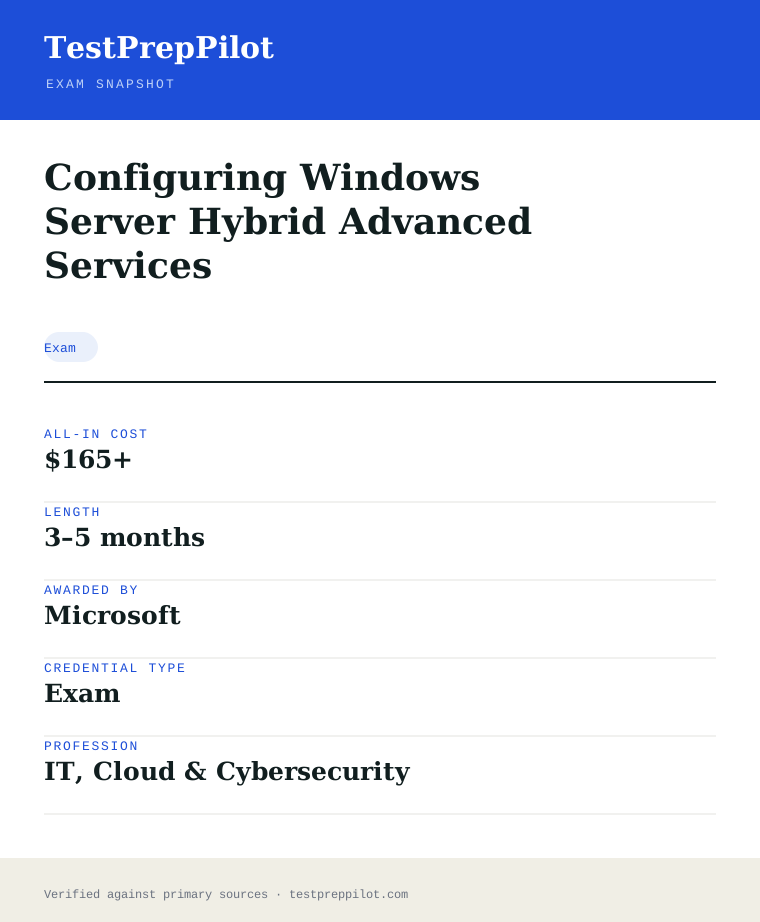
The short version
What is the Configuring Windows Server Hybrid Advanced Services and is it worth it?
AZ-801 covers advanced Windows Server hybrid configuration, security and disaster recovery alongside AZ-800.
- Advanced Windows Server
- Hybrid focus
- Renews yearly
What is it?
What exactly is the Configuring Windows Server Hybrid Advanced Services?
Configuring Windows Server hybrid advanced
AZ-801 is the second exam for the Windows Server Hybrid Administrator Associate, covering high availability, security and migration.
Before you book
Who is eligible to sit the Configuring Windows Server Hybrid Advanced Services?
Who it is for: Windows Server administrators
The test itself
What is the format of the Configuring Windows Server Hybrid Advanced Services?
The Configuring Windows Server Hybrid Advanced Services is administered by Pearson VUE and runs 120 minutes, contains 40–60 questions and requires 700 of 1000 to pass.
| Administered by | Pearson VUE |
|---|---|
| Questions | 40–60 |
| Time limit | 120 minutes |
| Pass mark | 700 of 1000 |
| Exam fee | $165 |
| Format | Multiple-choice + labs |
Content outline
What topics are on the Configuring Windows Server Hybrid Advanced Services?
The Configuring Windows Server Hybrid Advanced Services is weighted across 4 domains; the largest are High availability (25%), Security (25%), Migration (25%).
Weightings come from the official exam outline. Study time is best allocated in roughly these proportions rather than evenly across domains.
- High availability 25%
- Security 25%
- Migration 25%
- Monitoring 25%
Money & time
How much does the Configuring Windows Server Hybrid Advanced Services cost?
For the Configuring Windows Server Hybrid Advanced Services, the exam fee is $165; the all-in cost is typically $165+; most candidates spend 3–5 months preparing.
Cost breakdown
| AZ-801 | $165 |
|---|---|
| Typical total | $165+ |
Pairs with AZ-800.
Timeline
- Sit AZ-800 first test day
- Sit AZ-801 test day
Typical prep: 3–5 months
The path
How do you register for the Configuring Windows Server Hybrid Advanced Services?
- 1
Prepare with Microsoft Learn1–10 weeks depending on exam and experience
Work through the free official self-paced learning paths and, optionally, instructor-led courses for your exam. Microsoft Learn is the primary, no-cost study source and maps directly to the exam skills outline.
- 2
Schedule through Pearson VUEabout 15 minutes
Sign in with a personal Microsoft account (MSA) and schedule the exam on the Pearson VUE portal. Choose an in-person test center or online proctoring (OnVUE). Students and educators can use Certiport for Fundamentals exams.
Microsoft recommends a personal MSA account; a work or school account can lose exam records if you leave the organization.
- 3
Take the exam45–120 minutes depending on the exam
Arrive at the test center or launch the online proctoring session. Exams are computer-based and may include multiple-choice, drag-and-drop, case studies, and performance-based lab tasks in a live environment.
- 4
Receive results and badgescore at end; badge within a few days
You see a pass/fail result on screen immediately. A detailed score report is emailed within about 24 hours and posted to your Microsoft certification profile. On passing, your digital badge is issued via Credly.
- 5
Renew annuallyabout 45 minutes, once a year
Most Microsoft role-based, specialty, and fundamentals certifications expire after 12 months. Renew for free by passing a shorter online renewal assessment on Microsoft Learn before the expiry date — no need to retake the full exam.
The fine print
What are the retake and renewal rules for the Configuring Windows Server Hybrid Advanced Services?
- Proctoring & delivery
- Delivered by Pearson VUE. You can sit the exam at a Pearson VUE test center or take it online through OnVUE remote proctoring; the fee is the same for both. Online proctoring requires a quiet, private space, a working webcam, and a system check beforehand.
- Retake policy
- If you do not pass, you may retake the exam after 24 hours. A second failed attempt requires a 14-day waiting period, and any further attempts also require a 14-day wait between them, up to a maximum of five attempts in a 12-month period.
- Score reporting
- A pass/fail result is shown immediately after the exam. The official score report is emailed within about 24 hours and is also available in your Microsoft certification profile, with section-level feedback on how you performed.
- Recertification
- Microsoft role-based, specialty, and fundamentals certifications are valid for 12 months from the date earned. Renew at no cost by passing the shorter online renewal assessment on Microsoft Learn before the credential expires. Retired certifications cannot be renewed and must be re-earned through the active successor if one exists.
- Refunds & rescheduling
- Exam fees are generally non-refundable once a seat is purchased, but you can cancel or reschedule through Pearson VUE at no charge if you do so at least 24–48 hours before the appointment (exact window varies by region).
Context
Microsoft Azure / AI certifications compared
| Credential | Level | Focus | Exam fee | Validity | |
|---|---|---|---|---|---|
| AZ-900 Azure Fundamentals | Fundamentals | Cloud concepts | $99 | 1 year | |
| AI-900 Azure AI Fundamentals | Fundamentals | AI concepts | $99 | 1 year (retired Jun 30 2026) | |
| AI-901 Azure AI Fundamentals | Fundamentals | AI + Microsoft Foundry | $99 | 1 year | |
| AZ-104 Azure Administrator | Associate | Administer Azure | $165 | 1 year | |
| AZ-204 Azure Developer | Associate | Build cloud apps | $165 | 1 year (retired 2026) | |
| AZ-500 Azure Security Engineer | Associate | Security operations | $165 | 1 year (retires Aug 31 2026) | |
| AZ-700 Azure Network Engineer | Associate | Networking | $165 | 1 year | |
| AZ-140 Azure Virtual Desktop | Specialty | Virtual desktop (AVD) | $165 | 1 year | |
| AZ-305 Azure Solutions Architect | Expert | Solution design | $165 | 1 year |
What it pays
How much does this credential pay?
$96,800 median for network and computer systems administrators (BLS, May 2024)
The direct salary answer for AZ-801 is $96,800, the May 2024 median for Network and Computer Systems Administrators (SOC 15-1244), the closest Bureau of Labor Statistics occupation to the senior Windows Server hybrid administrator this exam certifies. Two caveats belong with that number. First, BLS classifies by job duties rather than by certificate, so the median describes everyone doing server and network administration work, including veterans with no Azure skills, which means cloud-fluent candidates typically sit above it and first-year hires below it. Second, this occupation is projected to decline 4 percent from 2024 to 2034, with about 14,300 openings a year arising almost entirely from replacement need, and the reason is directly relevant to AZ-801: routine administration is being automated and absorbed into cloud platforms, so the value in the labour market is shifting toward the advanced material this exam covers — securing hybrid infrastructure, high availability, disaster recovery and workload migration, which are exactly the skills that keep an administrator employed while lower-level tasks shrink. The distribution matters for realistic expectations: the lowest 10 percent earned less than $60,320 and the highest 10 percent more than $150,320, and AZ-801 holders who combine the credential with Azure Arc, Defender for Cloud and PowerShell automation cluster toward the top of that range. For comparison, software developers (SOC 15-1252) earned $133,080 at the median in the same release, which is the direction the automation-heavy parts of the senior infrastructure role drift over time, and Database Administrators and Architects (SOC 15-1245) earned $123,100. The realistic framing for a candidate is that AZ-801 is the credential that moves an on-premises senior administrator onto the modern hybrid platform rather than a wage bump attached to a title.
| Measure | Figure | Source / note |
|---|---|---|
| Median annual wage — network and computer systems administrators (SOC 15-1244) | $96,800 | BLS Occupational Outlook Handbook, May 2024 wage data. Closest BLS occupation to a senior Windows Server hybrid administrator. |
| Lowest 10 percent | less than $60,320 | BLS OOH Pay tab, May 2024 |
| Highest 10 percent | more than $150,320 | BLS OOH Pay tab, May 2024 |
| Median — software developers (SOC 15-1252) | $133,080 | BLS OOH, May 2024. Reference for the automation-heavy direction of the role. |
| Employment, 2024 / projected change | 331,500 jobs / -4% (2024-34) | BLS OOH for SOC 15-1244; ~14,300 openings a year, nearly all replacement need |
Job growth.-4% projected change 2024-34 for SOC 15-1244, with ~14,300 replacement openings a year (BLS OOH); security, HA/DR and migration skills are what keep senior administrators on the growing side of the role
Source: BLS Occupational Outlook Handbook — Network and Computer Systems Administrators
Your odds
What are the pass rates?
Microsoft publishes no pass rate for AZ-801 — plan against the scoring mechanics, the retake policy and the September 30, 2026 retirement
There is no published pass rate for AZ-801, because Microsoft does not release pass-rate statistics, first-time pass percentages, attempt counts or score distributions for any certification exam, and any percentage attached to AZ-801 on a forum or bootcamp page is anecdote or marketing rather than data. What Microsoft does publish is the scoring model, and it operates identically to AZ-800. The pass mark is 700 on a scale of 1 to 1,000, and Microsoft states explicitly that this is a scaled score which may not equal 70 percent of the available points, because candidates receive question sets of different difficulty and an easier form demands more raw points to reach 700. Counting questions in the exam and converting them to a percentage is therefore a wasted exercise that mostly generates panic. Two more published mechanics matter. First, an unknown subset of items on your form is unscored pilot content: you cannot identify which items they are and must answer them anyway, so an impossible-looking question may not count at all. Second, there is no penalty for guessing, so an unanswered question is strictly worse than a guess and nothing should be left blank. The retake policy adds real cost structure: you must wait 24 hours after a first failure before re-sitting, then 14 days between every subsequent attempt, with a maximum of five attempts in the 12 months following your first sitting, and the full $165 fee is charged each time — which makes a third attempt more expensive than the entire official study path. The scheduling fact that overrides everything in 2026 is the retirement: AZ-801 retires on September 30, 2026, and the Windows Server Hybrid Administrator Associate track consolidates into a single AZ-802 exam, so candidates must decide before starting whether to complete the AZ-800 plus AZ-801 pair by that date or switch to the successor.
Read this before quoting the number.No official pass rate exists for AZ-801 or for any Microsoft certification exam; treat every percentage you see as unverified. What is published and verifiable: 700 out of 1,000 scaled (not 70 percent of questions); unscored pilot items may be present; no penalty for guessing; 24-hour wait after the first failure and 14 days between subsequent attempts, maximum five attempts in 12 months; $165 per attempt. Exam retires September 30, 2026, with the track moving to a single AZ-802 exam.
Your schedule
How long should I study for it?
110-150 hours over 10-12 weeks of focused study
The planning answer for AZ-801 is that it is a 110 to 150 hour project over ten to twelve weeks for a candidate who has passed AZ-800 or has equivalent hybrid Windows experience, and the single most important planning fact is the September 30, 2026 retirement — you either complete the AZ-800 and AZ-801 pair before that date or you switch your plan to the consolidated AZ-802 exam. AZ-801 is the advanced half of the Windows Server Hybrid Administrator Associate certification and the blueprint, updated October 6, 2025, reflects that: Secure Windows Server on-premises and hybrid infrastructures carries 25-30 percent, Implement and manage Windows Server high availability 10-15 percent, Implement disaster recovery 10-15 percent, Migrate servers and workloads 20-25 percent, and Monitor and troubleshoot Windows Server environments 20-25 percent. Note the profile: this is not a beginner paper, and the blueprint assumes several years of Windows Server experience plus familiarity with the toolset the exam names — Windows Admin Center, PowerShell, Azure Arc, Azure Policy, Azure Monitor, Azure Update Manager, Microsoft Defender for Identity, Microsoft Defender for Cloud and IaaS VM administration. The plan below front-loads security because the hardening domain is the heaviest and because security choices — Defender for Identity deployment, credential protection, privileged access — reappear inside the migration and monitoring domains. It then moves through high availability and disaster recovery as a pair, since they are mechanically linked, leaves migration for after you can secure and replicate workloads, and finishes with monitoring and troubleshooting, which is partly the other domains under fault conditions. The lab is non-negotiable: security, HA/DR and migration questions on the exam reward having executed these tasks in a real environment, and a candidate who has actually failed over a workload understands the material differently from one who has only read about it.
- Week 06-8 hrs
Lab build and baseline
- Stand up a two-domain-controller lab with a workload VM, then attach the servers to Azure Arc
- Deploy an Azure subscription with a budget alert and a storage account for later migration practice
- Take the free official practice assessment cold for a per-domain baseline
- Confirm the AZ-801 retirement date and decide AZ-800+AZ-801 versus AZ-802
- Weeks 1-312-14 hrs/week
Domain 1 — Secure Windows Server on-premises and hybrid (25-30%)
- Harden the environment: credential protection, LAPS, privilege escalation mitigations and the principle of least privilege
- Deploy Microsoft Defender for Identity, Microsoft Defender for Cloud and Microsoft Defender for Servers across on-premises and Azure workloads
- Configure Windows Server security features such as Credential Guard, Just Enough Administration and Just-in-Time access
- Apply Azure Policy and security baselines, then deliberately break a control and verify it is detected
- Weeks 4-511-13 hrs/week
Domain 2 + 3 — High availability and disaster recovery (10-15% each)
- Implement Windows Server failover clustering and understand cluster-aware storage and networking requirements
- Configure Hyper-V Replica, Storage Replica and site failover so a workload actually comes back on the replica
- Set up Azure Site Recovery and Azure Backup for a hybrid workload and run a test failover
- Document the RPO and RTO of each solution you build — the exam frames HA and DR questions in those terms
- Weeks 6-812-14 hrs/week
Domain 4 — Migrate servers and workloads (20-25%)
- Plan and perform an on-premises to Azure IaaS migration for a Windows Server VM, including prerequisites and cutover
- Practise with Azure Migrate: discovery, assessment and dependency analysis before the move
- Migrate workload types that appear in the blueprint, including files, web workloads and Active Directory roles
- Rehearse the rollback path — the exam rewards knowing what to do when a migration goes wrong
- Weeks 9-1011-13 hrs/week
Domain 5 — Monitor and troubleshoot (20-25%) + consolidation
- Configure Azure Monitor, Log Analytics and Azure Update Manager across hybrid servers, and write a few basic KQL queries
- Practise a fixed diagnostic order: is the service running, is it reachable, are firewall and Defender controls interfering, is storage or capacity the constraint
- Diagnose from real breakage — have a script sabotage your lab, then fix it from symptoms
- Two full timed practice exams, then re-lab the two weakest domains
Adjusting the pace
Already certified in AZ-800 or holding the old MCSA/70-series background.Compress to eight weeks. Your networking, storage and Windows Server foundations transfer; spend the recovered time on security hardening and the Azure migration tooling, which are the parts of the blueprint most on-premises veterans have not done.
Azure-focused engineer with lighter Windows Server depth.Fourteen weeks at 10 hrs/week, with two extra weeks on failover clustering and Storage Replica — the HA domain assumes hands-on Windows Server experience.
Deadline-driven candidate after September 30, 2026.Do not race a retiring exam. The track consolidates to AZ-802; redirect the plan there and avoid paying twice.
How to study
How do I prepare most effectively?
The strategies that move an AZ-801 score are the ones that force execution in a real hybrid environment, because the blueprint is written in verbs — secure, implement, migrate, troubleshoot — and the exam rewards candidates who have actually done the work. The single highest-yield habit is to build the security domain by breaking things: deploy Microsoft Defender for Identity, apply a credential-protection control, then deliberately exploit or disable a control and watch what Defender reports, because the exam tests whether you understand the tooling’s behaviour rather than its menu structure. Second, treat high availability and disaster recovery as an executed pair rather than two topics: build a failover cluster, configure Hyper-V Replica or Storage Replica, then test failover and measure the actual RPO and RTO, because every HA question on the exam is really a question about what is lost when a failure occurs. Third, do at least one real migration end to end with Azure Migrate — discovery, assessment, dependency analysis, cutover and rollback — because migration is 20-25 percent of the paper and it is the domain where candidates with strong security knowledge but no migration experience lose the most marks. Fourth, learn the monitoring and troubleshooting domain as a fixed diagnostic order rather than a list of tools; when a scenario presents a symptom, the exam wants the next diagnostic step, and a rehearsed sequence — is it running, is it reachable, is a security control interfering, is capacity exhausted — carries you through unfamiliar faults. Fifth, use the free practice assessment three times as a diagnostic and chase the two weakest domain bars, and rehearse at least one multi-step task with a fifteen-minute clock and no documentation, because the lab and case-study formats punish slow navigation. Finally, remember the retirement date is part of the strategy: put September 30, 2026 on your calendar, and if the schedule does not fit, pivot to AZ-802 early rather than late.
Learn security by breaking things
Deploy Defender for Identity, enable Credential Guard or Just-in-Time access, then deliberately trigger a detection or disable a control and observe the telemetry. The exam tests tooling behaviour, and there is no substitute for having seen the alerts your own actions generate.
Execute HA and DR as one practised scenario
Build the cluster, configure replication, then fail over and measure the result. Candidates who have actually failed over a workload answer the RPO and RTO scenario questions differently from candidates who have only read about them.
Do one real migration with Azure Migrate
Run discovery and assessment, review dependency analysis, migrate a workload, then practise rollback. Migration is 20-25 percent of the paper and punishes candidates who have never performed a cutover.
Turn troubleshooting into a fixed diagnostic order
The scenario questions ask for the next diagnostic step, not the final fix. Rehearse a sequence — is it running, is it reachable, is a security control interfering, is capacity the constraint — until it is reflex.
Use the practice assessment as a diagnostic, not a mock exam
It is free, unlimited and has no labs, so a high score overstates readiness. Take it cold, mid-study and the week before; each time, spend the next week only on the two weakest domain bars.
Rehearse a task under a clock with no documentation
Microsoft does not publish which sittings include a lab. Prepare as if you will get one: complete a multi-step security, migration or DR task in fifteen minutes with only your own knowledge, because navigation speed is the real constraint in labs.
Plan against the retirement date from day one
AZ-801 retires September 30, 2026 and the track consolidates to AZ-802. Work backwards from that date; if the arithmetic does not fit, switch to AZ-802 instead of racing an exam you cannot sit.
What to buy
Which study resources are worth paying for?
The buying logic for AZ-801 resources is anchored by the official free materials and complicated by the September 30, 2026 retirement: the Microsoft Learn learning paths for this exam are the blueprint, are kept current with the October 6, 2025 objective update, and cost nothing, so the base programme is free. What is genuinely worth paying for is lab access and migration practice — the security, HA/DR and migration domains cannot be learned from reading, and an Azure subscription (typically $20-60 across a study window if you delete resource groups) plus Windows Server evaluation VMs covers the execution gap that video cannot. The free official practice assessment is the second non-negotiable resource: it is drawn from the exam domain, unlimited, and gives per-domain diagnostics no third-party bank can match for accuracy. Beyond those, paid practice tests from MeasureUp (~$99-129 list, frequently discounted) add question volume and worked explanations and are the clearest justification for a spend after a failed attempt, while Whizlabs tests (~$20-30) are a cheap second opinion whose explanations should be cross-checked against current docs. Video fills specific gaps well: John Savill’s free Azure content on YouTube is strong on the hybrid and security material, and Udemy courses at the $15-30 sale price give a structured narrative for candidates who do not hold attention with text. Formal instructor-led AZ-801T00 training runs $1,500-2,500 through Microsoft Learning Partners and is rarely worth self-funding given the free Learn path, though it is a legitimate employer-funded option. Because the exam retires in September 2026, confirm any third-party course covers the current Windows Server version and objectives before buying, and treat older MCSA-era material as historical reference only.
| Resource | Price | Format | Best for | |
|---|---|---|---|---|
| Microsoft Learn AZ-801 learning paths (official) | Free | Learning paths across security, HA/DR, migration and monitoring | The blueprint itself; kept current with the October 6, 2025 objective update | Start here — the paths are updated when the exam is updated |
| Microsoft official practice assessment | Free | Unlimited online question bank on Microsoft Learn | Per-domain diagnostics — take it cold, mid-study and the week before | Take it three times and chase the two weakest domain bars |
| Windows Server evaluation VMs + Azure subscription | Free evaluation VMs; $20-60 Azure spend if you delete resources | Self-built hybrid lab | The execution gap — security hardening, failover and migration all need a real environment | Set a budget alert on day one and delete resource groups between sessions |
| Microsoft exam sandbox (aka.ms/examdemo) | Free | Interactive exam-interface demo | Learning the case-study, hot-area and lab formats before exam day | Run it once before booking — the formats cost more time than the content |
| John Savill’s Technical Training (YouTube) | Free | Long-form whiteboard video | The Azure hybrid security and migration material, explained by a Microsoft MVP | Best free whiteboard coverage of the hybrid security and migration material |
| MeasureUp AZ-801 practice test | ~$99-129 list, frequently discounted | Timed practice exam with explanations | Question volume with worked explanations, especially after a failed attempt | The clearest buy after a failed attempt |
| Whizlabs AZ-801 practice tests | ~$20-30 | Question bank | Cheap readiness checks; cross-check explanations against current docs | Cross-check anything surprising against the docs |
| Udemy AZ-801 course | ~$15-30 on sale, $90+ list | Video course | A structured narrative if self-paced text does not hold your attention | Buy on sale; confirm it covers the October 2025 objectives |
| Official instructor-led AZ-801T00 | $1,500-2,500 via Learning Partners | Four-day class with labs | Employer-funded candidates who want a schedule and an instructor | Employer-funded only; the free Learn path covers the same ground |
Prices checked 2026-08-05, USD list before tax, regional adjustment, sales or employer discounts. Udemy list prices are close to fictional; the sale price is the real price. Because AZ-801 retires September 30, 2026, confirm any third-party course is written for the current Windows Server and the October 2025 objectives. We take no commission from any provider and order nothing by commercial relationship.
Avoid these
What mistakes do candidates most often make?
The most expensive AZ-801 mistake in 2026 is the calendar: studying for an exam that retires on September 30, 2026 without realising it, or buying material written for an older Windows Server version, which wastes both money and the window you have left. The second is treating security as a list of features to memorise rather than behaviour to understand — candidates who can name Credential Guard but have never seen it block an attack lose the scenario items that dominate the heaviest domain. The third is reading about high availability instead of building it: failover clustering, Hyper-V Replica and Storage Replica are execution topics, and a candidate who has never performed a failover cannot reliably answer the RPO and RTO questions the exam asks. The fourth is approaching migration without having done one — migration is 20-25 percent of the paper, and the cutover, rollback and dependency questions punish anyone who has only watched a demo. The fifth is skipping the monitoring and troubleshooting domain because it sounds like a rounding error, when it is 20-25 percent and is where the fixed diagnostic order separates prepared candidates from the rest. The sixth is mismanaging the scoring model: treating 700 as 70 percent of questions when it is a scaled score, leaving items blank when there is no penalty for guessing, or wasting time doing arithmetic in the exam. The seventh is planning to rely on the in-exam Microsoft Learn panel as a safety net; the panel is real but the clock does not stop, and candidates who browse end up with unanswered questions. Finally, some candidates re-sit immediately after a failure on the same knowledge, ignoring the retake policy’s cost structure and the score report’s diagnostic value.
✕Studying without checking the retirement date
✓AZ-801 retires September 30, 2026 and the track consolidates into AZ-802. Put the date in your calendar in week zero, verify you are studying the October 6, 2025 objectives, and decide early whether to finish the two-exam pair or switch to AZ-802.
✕Memorising security features instead of understanding their behaviour
✓The exam asks what happens when a control is deployed or defeated. Lab the tools — Defender for Identity, Credential Guard, Just-in-Time access — and generate your own detections so the behaviour, not the menu, is what you know.
✕Reading about HA and DR instead of building it
✓Failover clustering, Hyper-V Replica, Storage Replica and Azure Site Recovery are execution topics. Build them, fail a workload over, and measure the RPO and RTO — the scenario questions are built around those numbers.
✕Approaching migration without having performed one
✓Run a real Azure Migrate discovery-to-cutover cycle, including rollback. Migration is 20-25 percent of the paper and the dependency and cutover questions punish demo-only candidates.
✕Skipping the monitoring domain as a rounding error
✓Monitor and troubleshoot is 20-25 percent. Build a fixed diagnostic order and practise it against deliberately broken workloads; it is also where prepared candidates pick up cheap points.
✕Misreading the scoring model
✓700 is a scaled score, not 70 percent of questions; some items are unscored pilot content; guessing is free. Never leave a blank and stop doing percentage arithmetic in the exam.
✕Treating the Learn panel as a safety net
✓The panel is available on role-based exams but the clock keeps running. Use it for two or three precise lookups only; candidates who browse run out of time on a 120-minute exam.
✕Re-sitting on the same knowledge after a fail
✓The 24-hour rule permits a fast retake but the $165 fee and 14-day wait make it expensive. Use the skill-area bars on the score report, target the weakest areas for two weeks, then re-sit.
What you'll face
What question types will I see?
AZ-801 is an associate role-based exam, which means it uses Microsoft’s full item library and your form mixes standard multiple choice with interactive formats, and on some sittings includes a case study or a live lab. Microsoft does not publish a question count for AZ-801 and the number varies by form, but exam time is 120 minutes — 140 minutes of seat time including the NDA, instructions and survey — and most forms run roughly 40-60 items. Because it is an associate role-based exam, the Microsoft Learn panel is available inside the exam: the full learn.microsoft.com domain minus Q&A, practice assessments and your profile, with the clock running while you use it. Navigation rules matter as much as item format. Within a case study you answer a set of questions attached to a shared scenario and cannot return to the case study once you move past it, and taking an unscheduled break through the exam interface locks you out of every question already seen. The formats below are the standard role-based set, and the free exam sandbox at aka.ms/examdemo lets you handle every one before exam day — that single rehearsal is worth more than an extra practice test because the formats, not the content, are where candidates lose avoidable time. Most items cover generally available features, with preview features appearing only when they are in common use. The scoring rules to internalise: 700 scaled on a 1-1,000 scale, no penalty for guessing, and an unknown subset of items is unscored pilot content you cannot identify and must answer anyway. The scenario stems on this exam tend to be longer and more layered than on AZ-800, so underline the constraint clause — must remain available, must minimise downtime, must preserve compliance — before reading the options.
Scenario stems with a constraint — least downtime, must survive a single site failure, must not require reconfiguration — where several options technically work and one satisfies the constraint.
Select all that apply, sometimes with the required number stated. No partial credit, so evaluate each option independently.
Order the steps of a migration or failover, or match controls to requirements. Unused items may be present as distractors.
A rendered console, portal blade or PowerShell snippet with selectable regions. Console and portal familiarity converts directly into marks.
Multi-tab scenario — existing environment, requirements, technical constraints — followed by several questions. Read the requirements tab twice; you cannot return once you move past it.
A real environment in which you perform tasks, graded on end state. Labs can be removed at short notice for outages. If your form has one, you get the full 120 minutes of exam time.
The same scenario restated with a different proposed solution each time. All three can be yes, or all three no — evaluate each independently.
Flag uncertain items and return before submitting a section; an unscheduled break through the interface ends access to everything already seen.
Try these
Q1An organisation runs a mission-critical virtualised workload on a two-node Windows Server failover cluster and must keep it available if an entire rack is lost. The solution must minimise failover time and cannot rely on storage that is local to one node. Which configuration satisfies the requirement?
Answer:B
Storage Replica provides block-level replication so the cluster can fail the workload over to the surviving node even though storage is not shared, and it removes the single-array dependency that option A keeps. A is the classic distractor: a shared SAS array is conventional for failover clustering but creates a single point of failure at the storage layer, so losing the rack loses the storage and the workload. C replicates to a host in the same rack, which does not survive the rack loss the stem requires. D restores data but is a backup mechanism, not high availability — recovery time is measured in hours, not seconds, and it does not fail a running workload over automatically. When the stem pairs availability with a storage constraint, the answer is the replication technology that removes the shared dependency, not the traditional shared-array cluster.
Q2An administrator is migrating an on-premises Windows Server VM to Azure IaaS and must minimise downtime. The migration must preserve the server’s hostname, IP configuration on the new virtual network, and all installed roles. Which approach best meets the requirement?
Answer:D
Azure Site Recovery is the migration tool built for minimise-downtime cutovers: it replicates the VM continuously to Azure and a planned failover brings the workload up in a controlled switch with a short interruption window, preserving the replicated disk contents. A is a distractor that conflates tools: Azure Migrate handles discovery and assessment, while agent-based replication to an Azure VM for cutover is more commonly executed through Site Recovery or the Azure Migrate migration tooling — and even then, for a controlled, low-downtime cutover Site Recovery’s planned failover is the direct mechanism. B works for a one-shot migration but the downtime includes the VHD upload and VM provisioning, which is not minimised. C guarantees the longest downtime and the highest risk of drift, and it is not a migration. The stem’s minimise-downtime clause plus preserve-state requirement points to continuous replication with a planned failover.
Q3A hybrid environment has several on-premises Windows Server VMs connected to Azure Arc. The security team needs a central view of security findings, compliance status and recommended hardening actions for those servers, integrated with the organisation’s Azure subscription. Which service should be used?
Answer:A
Microsoft Defender for Cloud is the central console that surfaces security findings, regulatory compliance status and hardening recommendations, and Azure Arc-enabled servers register as connected cloud resources that Defender for Cloud can assess — exactly the central-view requirement. B gives a local administration tool with per-server views and no central security scoring across the fleet. C covers only update compliance, which is a subset of what the stem asks for. D provides a managed domain service for authentication, not a security-findings console for existing servers. When the stem asks for central security posture across hybrid machines, the Defender for Cloud plus Arc combination is the answer, and this pairing recurs throughout the security domain of the exam.
Samples are editor-written illustrations of the published blueprint, not live exam items.
The big day
What should I expect on exam day?
AZ-801 is delivered through Pearson VUE, at a test centre or online through OnVUE, and the direct exam-day answer is 120 minutes of exam time inside 140 minutes of seat time — the extra 20 minutes cover the NDA, instructions and post-exam survey — with a scaled pass mark of 700 on a 1-1,000 scale and no penalty for guessing. The test centre versus OnVUE choice is the first real decision. A centre gives you a supervised workstation, a physical erasable whiteboard genuinely useful for multi-step failover and migration scenarios, and no room scan; OnVUE gives you your own desk but a stricter environment — a 360-degree room scan, a clear desk, no second monitors, and no physical scratch paper unless it was explicitly approved on the booking. Check what your booking allows rather than assuming, because the rules have tightened and an item that was acceptable a year ago can end your session now. Whichever you choose, arrive or launch check-in thirty minutes early; OnVUE check-in can take twenty minutes on a bad day, and a late check-in is a forfeited fee. Inside the exam, the layered scenario stems on this exam reward a deliberate method: underline the constraint clause before reading the options, flag anything costing more than ninety seconds, and do not take an unscheduled break through the exam interface because it locks you out of everything already seen. If your form includes a case study, decide before the clock starts whether to work it first while fresh or last with a known budget, and read the requirements tab twice. The Microsoft Learn panel is available on this exam — use it for two or three precise lookups, never as a safety net, because the clock does not stop while you browse.
Bring
- Government-issued photo ID with your name matching your Microsoft Learn certification profile exactly — a middle-initial mismatch is a common and expensive turn-away
- A second form of ID for the test centre if your primary is not a passport or driving licence; check your Pearson VUE confirmation for what your country requires
- Your Pearson VUE confirmation and exam registration number
- At a test centre: nothing else; everything else goes into a locker
- For OnVUE: the phone used for check-in photo upload — it goes out of reach once check-in completes
- For OnVUE: a physical whiteboard with an erasable marker, only if explicitly permitted on your booking
Leave at home
- Phones, smartwatches, fitness trackers and earbuds — locker at a centre, out of the room entirely for OnVUE
- Your own paper, pens, notebooks and sticky notes
- Second monitors — OnVUE requires a single display, and a disconnected second monitor on the desk is still a violation
- Bags, coats, hats and any headwear not worn for religious reasons
- Food and drink beyond what the centre permits; a clear water bottle is sometimes allowed at centres but is not guaranteed
- Anyone else in the room for OnVUE — the proctor ends the session if another person is heard or seen
How the day runs
Rules in the room
- Pass mark is 700 on a 1-1,000 scale, and it is a scaled score that may not equal 70 percent of the questions.
- No penalty for incorrect answers — never leave an item blank.
- The Microsoft Learn panel is available because this is an associate role-based exam; it covers learn.microsoft.com minus Q&A, practice assessments and your profile, and the clock keeps running while you use it.
- You cannot return to a case study or completed section once you move past it, and an unscheduled break through the exam interface ends access to everything already seen.
- No breaks are scheduled; if you take one via the interface it carries the same navigation penalty.
- No scratch paper of your own — centres supply an erasable whiteboard; OnVUE candidates get no paper unless a physical whiteboard was explicitly approved on the booking.
- If the exam is not offered in your preferred language you can request an additional 30 minutes when booking; this must be requested in advance, not on the day.
- Assistive-device or extra-time accommodations must be requested and approved through Microsoft before you schedule.
Afterwards.You get a preliminary pass or fail on screen within minutes of submitting, and the official result posts to your Microsoft Learn certification profile within a few hours, occasionally a couple of business days if a lab needs grading. The score report shows one overall number against the 700 threshold plus a bar chart of relative performance across the five skill areas; Microsoft is explicit that those bars cannot be summed or read as percentages because the areas contain different numbers of questions, so treat them as relative diagnostics. If you passed, AZ-801 completes the Windows Server Hybrid Administrator Associate certification alongside AZ-800, which is valid for 12 months and renewed free via an online assessment whose window opens six months before expiry — set the reminder now, and note the whole track consolidates to a single AZ-802 exam after September 30, 2026. If you failed, the retake rules apply: 24 hours before a second attempt, 14 days between subsequent attempts, five attempts maximum in the 12 months from your first sitting, and the full $165 fee each time. Use the skill-area chart to target the retake rather than restudying everything, and change your question source — repeating the same practice bank mostly measures how well you have memorised that bank.
Reference
What are the key facts about the Configuring Windows Server Hybrid Advanced Services?
Configuring Windows Server Hybrid Advanced Services is a exam credential; awarded by Microsoft; the exam fee is $165; typical preparation is 3–5 months; holders typically earn $80,000 – $120,000.
| Credential | Configuring Windows Server Hybrid Advanced Services |
|---|---|
| Abbreviation | AZ-801 |
| Type | Exam |
| Profession | IT, Cloud & Cybersecurity |
| Specialty | Microsoft |
| Awarded by | Microsoft |
| Difficulty | Moderate |
| Typical prep time | 3–5 months |
| All-in cost | $165+ |
| Typical salary range | $80,000 – $120,000 |
| Exam code | AZ-801 |
| Plus | AZ-800 |
| Scope | National / Multi-state |
| Also known as | AZ-801 |
Real questions
Frequently asked questions about the Configuring Windows Server Hybrid Advanced Services
Does it expire?
Yes, after 12 months; renew with a free online assessment.
How do I register for microsoft-az-801?
You register and schedule microsoft-az-801 through Pearson VUE. Pick a test-centre appointment or online proctoring, then sit the exam on your booked date.
What is the microsoft-az-801 exam format?
The exam is delivered as Multiple-choice + labs, with about 40–60 items, in 120 minutes. The published pass mark is 700 of 1000.
How long is the microsoft-az-801 certification valid?
Most Microsoft role-based certifications expire after 12 months but are renewed with a free online assessment; retired certs must be re-earned.
How much does microsoft-az-801 cost?
The exam fee is $165. Optional study materials and retakes are priced separately.
Who should take microsoft-az-801?
Windows Server administrators
Can I take a Microsoft exam online from home?
Yes. Exams are delivered by Pearson VUE with two options: an in-person test center or OnVUE online proctoring from a private space with a webcam. The fee is identical for both.
Do Microsoft certifications expire?
Most role-based, specialty, and fundamentals certifications are valid for 12 months. You renew for free by passing a shorter online assessment on Microsoft Learn before the expiry date.
What happens if my certification is retired?
You keep the credential until its current expiry date, but you can no longer earn or renew it. Microsoft typically points candidates to the active successor exam or certification.
In short
Is the Configuring Windows Server Hybrid Advanced Services worth it?
- AZ-801 covers advanced Windows Server hybrid config.
- It pairs with AZ-800.
- It renews yearly.
Same awarding body
What other credentials does Microsoft award?
Worth comparing
How does the Configuring Windows Server Hybrid Advanced Services compare with similar credentials?
Trust
Where does this information come from?
Everything above is taken from the awarding body's own published material. Fees, question counts and domain weights are revised regularly — check the official page before you pay.
- Microsoft Awarding body
- Official Configuring Windows Server Hybrid Advanced Services exam page Exam page
- Microsoft certification programme Programme rules
Research confidence: high · Last reviewed 2026-08