IT, Cloud & Cybersecurity • Certification
CompTIA Tech+
CompTIA Tech+ — Technology credential from CompTIA
Researched and maintained by TestPrepPilot Editorial BoardIT entry-level & emerging-tech certifications desk · Figures last verified August 2026
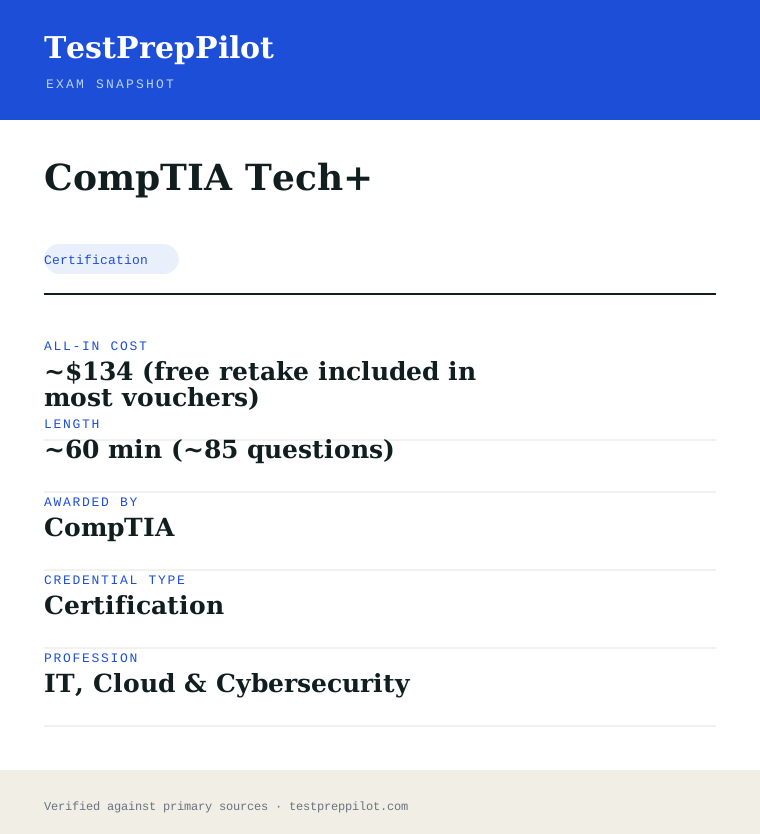
The short version
What is the CompTIA Tech+ and is it worth it?
CompTIA Tech+ is a professional credential administered by CompTIA. It validates job-ready knowledge and skills in the Technology field and is used for career entry, advancement, or compliance.
- Recognized credential from CompTIA
- Demonstrates verified competence in Technology
- Supports career advancement and may satisfy licensing or employer requirements
What is it?
What exactly is the CompTIA Tech+?
CompTIA Tech+ — Technology credential from CompTIA
Foundational CompTIA certification that replaced ITF+, covering IT concepts, infrastructure, software development, databases, security and AI basics. Offered by CompTIA, it is designed for candidates who need to demonstrate verified competence in the Technology field. The credential is commonly used for career entry, advancement, regulatory compliance, or employer requirements. Candidates should review the official handbook for eligibility, exam format, and scoring before registering.
The path in brief
- Confirm you meet any eligibility or prerequisites
- Review the official handbook and study materials
- Register and pay through the awarding body or authorized provider
- Schedule and take the exam (test center or online proctoring)
- Receive your score and, if passed, your credential
Before you book
Who is eligible to sit the CompTIA Tech+?
None
Who it is for: Professionals and candidates seeking to validate Technology competence.
The test itself
What is the format of the CompTIA Tech+?
The CompTIA Tech+ is administered by CompTIA and runs ~60 min.
| Administered by | CompTIA |
|---|---|
| Questions | ~85 |
| Time limit | ~60 min |
| Pass mark | Passing score set by the awarding body; see the official score report |
| Exam fee | ~$134 |
| Format | Proctored, computer-based (test center or online remote proctoring) |
Content outline
What topics are on the CompTIA Tech+?
The CompTIA Tech+ covers 4 content domains.
Weightings come from the official exam outline. Study time is best allocated in roughly these proportions rather than evenly across domains.
- Foundational concepts
Topic area tested on the exam; see the official blueprint for the detailed breakdown.
- Configuration & deployment
Topic area tested on the exam; see the official blueprint for the detailed breakdown.
- Security & compliance
Topic area tested on the exam; see the official blueprint for the detailed breakdown.
- Operations & troubleshooting
Topic area tested on the exam; see the official blueprint for the detailed breakdown.
The path
How do you register for the CompTIA Tech+?
- 1
Create your accounts10 minutes
Set up a free CompTIA account and a Pearson VUE account. Your CompTIA account is where the certification and CEUs are tracked; Pearson VUE handles scheduling and delivery.
Use a consistent email so your exam result links to your CompTIA record.
- 2
Purchase an exam voucher1 day
Buy the XK0-006 voucher from the CompTIA store (standard $390 USD). Optionally choose an exam+retake bundle or add CertMaster training.
- Select Linux+ (XK0-006) in the CompTIA store
- Choose voucher only, exam+retake bundle, or bundle with training
- Save the voucher code from your CompTIA account
- 3
Schedule your exam15 minutes
Go to Pearson VUE, enter your voucher code, and book a date. Choose a nearby test center or online proctoring (OnVUE).
- Pick test center or OnVUE online
- Run the OnVUE system check if testing at home
- Confirm date, time, and time zone
- 4
Prepare your ID and environmentTest-day prep
Bring a government-issued photo ID to a center. For online testing, prepare a quiet private room, clear your desk, and have your webcam ready for the check-in scan.
Accepted ID rules follow Pearson VUE policy (typically passport or driver's license matching your account name).
- 5
Take the exam90 minutes
Complete up to 90 questions in 90 minutes, including multiple-choice and performance-based items. You see a pass/fail result on screen immediately after finishing.
- 6
Claim and maintain your certificationA few days
Your certification appears in CompTIA CertCentral. Log in to download the e-certificate and start tracking the 50 CEUs needed to renew within 3 years.
The fine print
What are the retake and renewal rules for the CompTIA Tech+?
- Proctoring & delivery
- Delivered by Pearson VUE with two options: an in-person proctored test center, or online proctoring via OnVUE with a live remote proctor (requires webcam, stable internet, and a private room).
- Retake policy
- If you do not pass, you may retake XK0-006 after a 14-day waiting period. Each attempt requires a new exam voucher; there is no limit on the number of retakes. CompTIA's standard candidate agreement governs retake rules.
- Score reporting
- A pass/fail result is shown on screen immediately after the exam. A detailed score report by domain is available in your Pearson VUE account and mirrored in your CompTIA CertCentral record.
- Recertification
- Linux+ is valid for 3 years from the certification date. Renew by earning 50 Continuing Education (CE) credits and paying the CE fee through CompTIA CertCentral, by earning a higher-level CompTIA certification, or by passing the current XK0-006 exam again.
- Refunds & rescheduling
- Exam vouchers are generally non-refundable but may be transferable or have a defined expiry; optional CertMaster training may be refundable within a limited window per CompTIA's terms. Review voucher terms at purchase.
Context
Linux certifications compared
| Credential | Vendor | Level | Exam | Validity | |
|---|---|---|---|---|---|
| CompTIA Linux+ | CompTIA | Vendor-neutral | Intermediate | 1 exam (XK0-006) | 3 years |
| LPIC-1 | Linux Professional Institute | Vendor-neutral | Entry | 2 exams (101 + 102) | 5 years |
| Red Hat RHCSA | Red Hat | Vendor-specific | Entry | 1 exam (performance lab) | 3 years |
What it pays
How much does this credential pay?
Tech+ is the entry IT credential: computer support specialists earned a $61,550 median in May 2024 (BLS)
CompTIA Tech+ (formerly ITF+) is CompTIA’s entry-level certification, designed for people beginning an IT career - it covers IT fundamentals, hardware, software, networking, security and database basics without assuming prior IT experience. It is an entry-level certification rather than a job license, so no single BLS SOC code attaches to it; the salary story belongs to the IT support occupations it leads toward. BLS reported that computer support specialists (SOC 15-1231) earned a median of $61,550 in May 2024, projected to grow 6 percent from 2024 to 2034, and computer user support specialists specifically about $57,910 (OEWS); help-desk and entry-level IT roles - the first jobs Tech+ holders target - sit in these ranges, and the certification’s role is the first rung on the CompTIA ladder (Tech+ to A+ to Network+ and beyond). The structural point is that Tech+ is aimed at career changers and students with no IT background: it validates that the holder understands how computers, networks and software work, which is the baseline that help-desk and support employers expect, and it is a common first certification in workforce and academic IT programs. BLS classifies workers by occupation, not certifications, so no certificate maps to a specific wage; the value is the entry signal in a market where the first IT job rewards demonstrated fundamentals. The exam is a single test (exam code FC0-U11 for Tech+, succeeding the ITF+ FC0-U61), passes at 650/900, and costs about $134 (verify current pricing), with no experience prerequisite.
| Measure | Figure | Source / note |
|---|---|---|
| Computer support specialists median, May 2024 | $61,550 | BLS OEWS, SOC 15-1231 |
| Computer user support specialists median, May 2024 | ~$57,910 | BLS OEWS, SOC 15-1231 |
| All-occupation median, May 2024 | $49,500 | BLS OEWS |
| Tech+ exam | Single exam (FC0-U11) | CompTIA, 650/900 passing |
Job growth.Computer-support employment is projected to grow 6 percent from 2024 to 2034; entry-level IT roles remain a common entry path.
Source: BLS Occupational Outlook Handbook - Computer Support Specialists
Your odds
What are the pass rates?
CompTIA Tech+ requires a passing score of 650 on a 900-point scale; CompTIA publishes no pass rates
CompTIA does not publish pass rates for its certifications, but the assessment mechanics are public. The CompTIA Tech+ exam (exam code FC0-U11, which succeeded the ITF+ FC0-U61) is a single computer-based test with about 85 questions and a time allowance near 60 minutes (verify the current question count and time on the CompTIA page, as details can be updated), with a passing score of 650 on a 900-point scale. The exam covers six domains published by CompTIA: IT concepts and terminology, infrastructure (hardware and networking), applications and software, software development concepts, database fundamentals, and security. The exam is designed for candidates with no prior IT experience - it is the certification CompTIA recommends before A+ - and the items test recognition and fundamentals rather than hands-on troubleshooting (which is the A+ tier). The exam is delivered by Pearson VUE online or at test centers, costs about $134 (verify current pricing), and includes a free retake with the CompTIA exam voucher purchase in most formats (CompTIA bundles one free retake with the standard voucher; verify the current offer). The certification does not expire (CompTIA’s foundational certifications carry no mandatory renewal, unlike the CE-track certifications). The honest summary is that the passing bar is 650/900 on a fundamentals-level exam, no pass-rate data exists, and the published exam objectives are the authoritative preparation blueprint.
Read this before quoting the number.CompTIA publishes no pass rates; Tech+ requires 650/900 with ~85 questions (verify current details). The voucher typically includes one free retake.
Source: CompTIA Tech+ certification
Your schedule
How long should I study for it?
30-60 hours over 3-6 weeks of focused study
A realistic Tech+ plan runs 30-60 hours over 3-6 weeks for candidates with no IT background - the certification is designed to be achievable without prior experience. Week 1: review the published exam objectives (the six domains) and take a baseline assessment; candidates who are comfortable with basic computer use start ahead of the curve. Weeks 2-4: work through the six domains with a structured study resource - IT concepts and terminology (computing basics, components), infrastructure (hardware, networking and connectivity), applications and software (OS basics, application types), software development concepts (programming fundamentals, lifecycle), database fundamentals (database concepts, SQL basics), and security (threats, best practices) - using the official CompTIA study guide or a reputable course; the content is broad but shallow, so the goal is coverage, not depth. Week 5: hands-on reinforcement - use a virtual machine to practice OS basics and file management, because the fundamentals stick when touched; review the security best-practices section, which is the most job-relevant. Week 6: take the official practice questions and sample tests, drill the exposed gaps, and take the real exam. The dominant resources are the CompTIA study materials (official guide about $60-100, the CompTIA Learn subscription, or third-party books at $20-50), the free exam objectives PDF, and practice tests; the exam fee is about $134 with a free retake included in most vouchers.
- Week 15
Objectives and baseline
- Review the six domains
- Baseline assessment
- Weeks 2-435
Domain coverage
- Study guide: all six domains
- Security and networking emphasis
- Week 510
Hands-on reinforcement
- Virtual machine OS practice
- Security best-practices review
- Week 68
Practice and real exam
- Official practice questions
- Drill gaps; take the exam
Adjusting the pace
Experience track.Candidates with some IT exposure can compress to 2-3 weeks and focus on the practice tests.
Path to A+.Tech+ is the recommended precursor to A+, which is the standard first credential for help-desk roles.
How to study
How do I prepare most effectively?
The most effective Tech+ strategies exploit its breadth-without-depth design. Strategy one: use the published exam objectives as the checklist - the six domains define the scope exactly, and candidates who work through the objectives systematically cover the material without over-studying any single topic; the exam rewards breadth. Strategy two: prioritize the domains that carry the most job relevance and question weight - infrastructure (hardware and networking) and security are the two areas that also matter for the A+ and the first IT job, and the security items test practical best practices. Strategy three: reinforce the fundamentals hands-on - install a virtual machine and practice OS basics, file management and basic networking commands, because the fundamentals stick when touched, and the exam rewards recognition that hands-on exposure builds. Strategy four: learn the terminology precisely - the exam tests the vocabulary (RAM vs ROM, TCP/IP basics, the OSI model at a recognition level, SQL basics), and candidates who know the terms answer faster. Strategy five: use the official practice questions and a reputable question bank for exam-condition repetition, because the question style is distinctive. Strategy six: take the exam early enough in the career journey to use the free retake if needed, and plan the next step (A+) while the fundamentals are fresh, because the certification is the first rung, not the destination.
Work the objectives checklist
The six domains define the scope; cover them systematically.
Prioritize infrastructure and security
The most job-relevant and question-heavy domains.
Reinforce hands-on
A virtual machine makes the fundamentals stick.
Learn the terminology precisely
Recognition of terms is the exam’s core.
Plan the A+ next
Tech+ is the first rung; A+ is the standard help-desk credential.
What to buy
Which study resources are worth paying for?
The Tech+ resource market has a clear official core and affordable commercial options. The free exam objectives PDF on the CompTIA website is the blueprint. The official CompTIA Tech+ study guide (about $60-100) and the CompTIA Learn subscription (which includes the guide, labs and practice questions) are the official study path; third-party study books ($20-50) and online courses ($50-300) cover the same scope, and the major publishers’ Tech+/ITF+ books are serviceable. Practice tests and question banks ($20-100) provide exam-condition repetition. Hands-on practice requires only a virtual machine (free options like VirtualBox with a free OS), which is the recommended reinforcement. The exam fee is about $134 (verify current pricing), and the voucher typically includes one free retake. The honest ranking: the free objectives, the official study guide or a reputable third-party book, a practice-question bank, and a course only for structured learners. Prices here are current as of 2025-26 and change annually.
| Resource | Price | Format | Best for |
|---|---|---|---|
| CompTIA exam objectives | Free PDF | Downloadable | The exam blueprint |
| Official study guide / Learn subscription | $60-$100+ | Print/online | The official study path |
| Third-party book / course | $20-$300 | Print/online | Coverage and structure |
| Practice-question bank | $20-$100 | Online | Exam-condition repetition |
| Virtual machine practice | Free | Desktop | Hands-on reinforcement |
Prices dated 2025-26; the Tech+ exam fee is ~$134 with a free retake in most vouchers. No commission-based ranking.
Avoid these
What mistakes do candidates most often make?
The most common Tech+ mistakes come from over-studying or under-studying a fundamentals exam. Mistake one: over-preparing - treating a fundamentals exam like the A+; candidates who spend hundreds of hours are over-investing, because the content is recognition-level and the objectives PDF plus a study guide covers it. Mistake two: the opposite - skipping the study guide and testing on general knowledge; the exam tests specific terminology (RAM vs ROM, OSI layers at a recognition level, SQL basics) that casual knowledge does not fully cover. Mistake three: going too deep on single topics; the exam rewards breadth across the six domains, and candidates who dive deep into one area at the expense of coverage miss items in the others. Mistake four: using ITF+ (retired) materials without checking the Tech+ objectives; the exam codes differ (FC0-U61 vs FC0-U11), and the objectives should be verified. Mistake five: ignoring the security domain, which is the most job-relevant and carries solid weight. Mistake six: skipping the free retake planning; the voucher includes a free retake, and candidates who treat the first attempt as one-shot add stress - the plan should use the retake if the practice-test scores are borderline.
✕Over-preparing a fundamentals exam
✓30-60 hours is the realistic range.
✕Skipping the terminology study
✓Learn the specific terms the objectives list.
✕Going deep instead of broad
✓The exam rewards coverage across six domains.
✕Using retired ITF+ material
✓Verify the Tech+ objectives and exam code.
✕Ignoring the free retake
✓The voucher includes one free retake - plan for it.
What you'll face
What question types will I see?
The CompTIA Tech+ exam (FC0-U11) is a single computer-based test of about 85 questions in about 60 minutes (verify current details), passing at 650/900. The six domains: IT concepts and terminology, infrastructure (hardware and networking), applications and software, software development concepts, database fundamentals, and security. The exam is fundamentals-level, testing recognition and understanding rather than hands-on troubleshooting. Samples below are editor-written illustrations of the published exam objectives, not live exam items.
Computing basics and components.
Hardware, networking and connectivity.
OS basics and application types.
Dev concepts, SQL basics, security best practices.
Try these
Q1Which component is the primary temporary working memory that a computer uses while running programs?
Answer:A
RAM (random access memory) is the volatile working memory used while programs run; ROM is read-only firmware, and the hard drive is permanent storage.
Q2Which protocol is used to translate a domain name into an IP address?
Answer:A
DNS (Domain Name System) resolves domain names to IP addresses; DHCP assigns addresses, FTP transfers files, and SMTP sends mail.
Q3Which security practice is most appropriate for protecting an account against unauthorized access?
Answer:A
Strong unique passwords plus multi-factor authentication are core security best practices; the other options weaken account security.
Samples are editor-written illustrations of the published exam objectives, not live exam items.
The big day
What should I expect on exam day?
The CompTIA Tech+ exam is delivered by Pearson VUE at test centers and online with a proctor. At a test center, arrive 30 minutes early with a valid ID; personal electronics are not permitted. The exam runs about 60 minutes, and the passing score is 650/900; results appear on screen immediately at the test center (official confirmation follows within a few days). For online delivery, complete the Pearson VUE system check ahead of time, use a quiet private room, and follow the proctor’s rules. If the first attempt falls short, the voucher’s free retake is used (retakes after the free one require a new voucher). After passing, the certification is added to the CompTIA account with a badge; the foundational certification does not carry a mandatory renewal (unlike the CE-track certifications). Afterwards, add the badge to LinkedIn and your resume, and plan the next step - typically the A+ certification, which is the standard credential for help-desk and support roles.
Bring
- Valid photo ID
- Appointment confirmation
- Online: verified system and quiet room
- CompTIA account sign-in
Leave at home
- Phone, smartwatch, and personal electronics
- Notes or study materials
- Second monitors or devices for online delivery
How the day runs
Rules in the room
- Valid ID is mandatory; personal electronics are prohibited.
- The passing score is 650/900 (verify current).
- The voucher typically includes one free retake.
- The foundational certification does not require renewal.
Afterwards.Add the badge to LinkedIn and your resume, and plan the A+ certification as the standard next step for help-desk and support roles.
Reference
What are the key facts about the CompTIA Tech+?
CompTIA Tech+ is a certification credential; awarded by CompTIA; the exam fee is ~$134; typical preparation is ~60 min (~85 questions); holders typically earn $35,000-$65,000 (entry IT support roles).
| Credential | CompTIA Tech+ |
|---|---|
| Abbreviation | Tech+ |
| Type | Certification |
| Profession | IT, Cloud & Cybersecurity |
| Specialty | CompTIA |
| Awarded by | CompTIA |
| Difficulty | Intermediate |
| Typical prep time | ~60 min (~85 questions) |
| All-in cost | ~$134 (free retake included in most vouchers) |
| Typical salary range | $35,000-$65,000 (entry IT support roles) |
| Credential | CompTIA Tech+ |
| Awarding body | CompTIA |
| Exam format | Proctored, computer-based |
| Validity | Varies by credential (commonly 2–3 years) |
| Languages | Varies — see awarding body |
| Scope | National / Multi-state |
| Also known as | FC0-U71 |
Real questions
Frequently asked questions about the CompTIA Tech+
How do I register for the CompTIA Tech+ exam?
Register through CompTIA's official portal or an authorized test provider (e.g., Pearson VUE or Prometric where applicable). Create an account, select the exam, pay the fee, and schedule a date.
How much does the exam cost?
Fees vary by location and currency. Confirm the current fee on the official registration page before scheduling.
How long is the credential valid, and how do I renew?
Tech+ (FC0-U11) passes at 650/900 and is CompTIA's entry credential, recommended before A+; the voucher typically includes one free retake.
What if I do not pass?
Most bodies allow retakes after a waiting period and payment of the full or partial fee. Check CompTIA's retake policy before rescheduling.
Who issues the Linux+ certification?
CompTIA (the Computing Technology Industry Association), a vendor-neutral certifying body. The exam is delivered through Pearson VUE and the credential is ANSI-accredited to ISO/IEC 17024.
How do I renew a CompTIA certification?
Through CompTIA CertCentral: accumulate the required Continuing Education (CE) credits (50 for Linux+) and pay the CE fee, earn a higher CompTIA cert, or retake the current exam. Most CompTIA certs follow the 3-year renewal cycle.
Are CompTIA exam vouchers refundable?
Vouchers are typically non-refundable but may be transferable and carry an expiry date. Optional training products may have a limited refund window. Always review the terms shown at purchase in the CompTIA store.
In short
Is the CompTIA Tech+ worth it?
- CompTIA Tech+ is awarded by CompTIA.
- Validates job-ready competence in Technology.
- Registration is through the awarding body or an authorized test provider.
- Renewal and retake policies vary — confirm before scheduling.
Same awarding body
What other credentials does CompTIA award?
Worth comparing
How does the CompTIA Tech+ compare with similar credentials?
Trust
Where does this information come from?
Everything above is taken from the awarding body's own published material. Fees, question counts and domain weights are revised regularly — check the official page before you pay.
- CompTIA Awarding body
- CompTIA certification programme Programme rules
Research confidence: low · Last reviewed 2026-08