IT, Cloud & Cybersecurity • Certification
CompTIA Linux+
Prove you can actually run Linux — vendor-neutral, performance-based, and built for modern cloud and DevOps roles.
Researched and maintained by TestPrepPilot Editorial BoardCloud, IT & cybersecurity certifications desk · Figures last verified August 2026
The short version
What is the CompTIA Linux+ and is it worth it?
Linux+ (XK0-006) is a single, performance-based exam proving job-ready Linux administration: you configure, secure, script, containerize, and troubleshoot Linux systems both on-prem and in the cloud.
- Vendor-neutral — skills transfer across every major Linux distribution and cloud
- Performance-based questions (PBQs) prove hands-on command-line ability, not just memorization
- Maps directly to junior Linux / cloud / DevOps support engineer job roles
- ANSI-accredited to ISO/IEC 17024 and approved for DoD 8140 (IAT Level II) positions
- Renews in 3 years and stacks toward other CompTIA certifications
What is it?
What exactly is the CompTIA Linux+?
Prove you can actually run Linux — vendor-neutral, performance-based, and built for modern cloud and DevOps roles.
CompTIA Linux+ (exam XK0-006) is a vendor-neutral certification that validates real-world Linux system administration across on-premises and cloud server environments. It covers system management, security hardening, scripting, containerization, automation, and troubleshooting — the daily work of a Linux administrator rather than distribution-specific trivia. Because it is distribution-agnostic, the skills transfer across Ubuntu, Red Hat, Debian, SUSE, and the major clouds. It is frequently paired with CompTIA's A+, Network+, and Security+ or used as a stepping stone toward cloud, DevOps, and cybersecurity careers, and it is approved for DoD 8140 (formerly 8570) IAT Level II roles.
The path in brief
- Confirm 12 months of hands-on Linux experience (or study to close the gap)
- Buy the XK0-006 exam voucher from the CompTIA store
- Build a free lab with VirtualBox/VMware or a cloud instance
- Study the four weighted domains and practice PBQs daily
- Schedule and pass the 90-minute Pearson VUE exam
- Earn CEUs in CertCentral to keep the cert active for 3 years
Before you book
Who is eligible to sit the CompTIA Linux+?
Open to all candidates 18+ (minors may test with parental consent per Pearson VUE policy). No mandatory prerequisite certification is required to sit the exam.
Who it is for: Junior Linux administrators, cloud/DevOps support engineers, systems administrators, and IT/security pros adding Linux skills.
The test itself
What is the format of the CompTIA Linux+?
The CompTIA Linux+ is administered by Pearson VUE (test center or online OnVUE proctoring) and runs 90 minutes and requires 720 (on a scale of 100–900) — CompTIA publishes a numeric passing score for Linux+ to pass.
| Administered by | Pearson VUE (test center or online OnVUE proctoring) |
|---|---|
| Questions | Maximum of 90 (mix of multiple-choice and performance-based) |
| Time limit | 90 minutes |
| Pass mark | 720 (on a scale of 100–900) — CompTIA publishes a numeric passing score for Linux+ |
| Exam fee | $390 USD (CompTIA list; resellers often $330–369) |
| Format | Multiple-choice and performance-based questions (PBQs) |
Content outline
What topics are on the CompTIA Linux+?
The CompTIA Linux+ is weighted across 4 domains; the largest are System Management (32%), Troubleshooting (28%), Security (21%).
Weightings come from the official exam outline. Study time is best allocated in roughly these proportions rather than evenly across domains.
- System Management 32%
Linux fundamentals, FHS, boot process (BIOS/UEFI, GRUB2), package management (apt, dnf/yum, rpm), file permissions, storage/LVM, systemd, users/groups, networking, and kernel/process/service management.
- Security 21%
File/directory permissions (SUID/SGID/sticky bit), SELinux and AppArmor, PAM, user and group security, SSH hardening, firewalls (iptables, firewalld, ufw), encryption, and PKI basics.
- Scripting, Containers, and Automation 19%
Bash scripting (variables, conditionals, loops, functions, exit codes), regex with grep/sed/awk, Git, Docker/Podman containers, orchestration concepts, and Ansible/Infrastructure-as-Code basics.
- Troubleshooting 28%
Diagnosing CPU/memory/disk issues (top, vmstat, iostat, free, df/du), network troubleshooting (ip, ss, tcpdump), log analysis (journalctl, /var/log), and boot/hardware recovery.
The path
How do you register for the CompTIA Linux+?
- 1
Create your accounts10 minutes
Set up a free CompTIA account and a Pearson VUE account. Your CompTIA account is where the certification and CEUs are tracked; Pearson VUE handles scheduling and delivery.
Use a consistent email so your exam result links to your CompTIA record.
- 2
Purchase an exam voucher1 day
Buy the XK0-006 voucher from the CompTIA store (standard $390 USD). Optionally choose an exam+retake bundle or add CertMaster training.
- Select Linux+ (XK0-006) in the CompTIA store
- Choose voucher only, exam+retake bundle, or bundle with training
- Save the voucher code from your CompTIA account
- 3
Schedule your exam15 minutes
Go to Pearson VUE, enter your voucher code, and book a date. Choose a nearby test center or online proctoring (OnVUE).
- Pick test center or OnVUE online
- Run the OnVUE system check if testing at home
- Confirm date, time, and time zone
- 4
Prepare your ID and environmentTest-day prep
Bring a government-issued photo ID to a center. For online testing, prepare a quiet private room, clear your desk, and have your webcam ready for the check-in scan.
Accepted ID rules follow Pearson VUE policy (typically passport or driver's license matching your account name).
- 5
Take the exam90 minutes
Complete up to 90 questions in 90 minutes, including multiple-choice and performance-based items. You see a pass/fail result on screen immediately after finishing.
- 6
Claim and maintain your certificationA few days
Your certification appears in CompTIA CertCentral. Log in to download the e-certificate and start tracking the 50 CEUs needed to renew within 3 years.
The fine print
What are the retake and renewal rules for the CompTIA Linux+?
- Proctoring & delivery
- Delivered by Pearson VUE with two options: an in-person proctored test center, or online proctoring via OnVUE with a live remote proctor (requires webcam, stable internet, and a private room).
- Retake policy
- If you do not pass, you may retake XK0-006 after a 14-day waiting period. Each attempt requires a new exam voucher; there is no limit on the number of retakes. CompTIA's standard candidate agreement governs retake rules.
- Score reporting
- A pass/fail result is shown on screen immediately after the exam. A detailed score report by domain is available in your Pearson VUE account and mirrored in your CompTIA CertCentral record.
- Recertification
- Linux+ is valid for 3 years from the certification date. Renew by earning 50 Continuing Education (CE) credits and paying the CE fee through CompTIA CertCentral, by earning a higher-level CompTIA certification, or by passing the current XK0-006 exam again.
- Refunds & rescheduling
- Exam vouchers are generally non-refundable but may be transferable or have a defined expiry; optional CertMaster training may be refundable within a limited window per CompTIA's terms. Review voucher terms at purchase.
Context
Linux certifications compared
| Credential | Vendor | Level | Exam | Validity | |
|---|---|---|---|---|---|
| CompTIA Linux+ | CompTIA | Vendor-neutral | Intermediate | 1 exam (XK0-006) | 3 years |
| LPIC-1 | Linux Professional Institute | Vendor-neutral | Entry | 2 exams (101 + 102) | 5 years |
| Red Hat RHCSA | Red Hat | Vendor-specific | Entry | 1 exam (performance lab) | 3 years |
What it pays
How much does this credential pay?
$96,800 median for network and computer systems administrators (BLS, May 2024)
There is no Bureau of Labor Statistics occupation called "Linux administrator", so any salary page that quotes one is quoting a job-board aggregate rather than government data. The closest official fit is Network and Computer Systems Administrators, and we have chosen it deliberately over the support-specialist categories used for entry-level credentials: Linux+ is not an entry certification. CompTIA positions it at roughly twelve months of hands-on Linux server experience, and the tasks on the blueprint — storage and filesystem management, systemd service administration, firewall configuration, container runtimes, shell and Python scripting — are administrator work, not help-desk work. That occupation had a May 2024 median of $96,800, with the lowest 10 percent under $60,320 and the highest 10 percent over $150,320. The distribution is worth reading carefully because Linux+ candidates tend to sit at both ends of it: someone adding Linux to a Windows-centric administration career is competing near the middle, while a Linux+ holder who converts the automation and container objectives into real platform-engineering work moves toward the top decile fairly quickly. The occupational headwind is real and should be stated plainly. BLS projects a 4 percent employment decline for network and computer systems administrators from 2024 to 2034, with about 14,300 openings a year arising entirely from replacement need. The infrastructure that is disappearing is manual, per-server administration — which is precisely why the automation, orchestration and scripting domain is the part of Linux+ worth over-investing in. The Linux Foundation's annual Open Source Jobs Report is the best-known named industry survey covering this workforce; we have not quoted a figure from it here because it does not isolate Linux+ holders specifically.
| Measure | Figure | Source / note |
|---|---|---|
| Median annual wage, network and computer systems administrators | $96,800 | BLS Occupational Outlook Handbook, May 2024 ($46.54/hr) |
| Lowest 10 percent | less than $60,320 | BLS OOH Pay tab, May 2024 |
| Highest 10 percent | more than $150,320 | BLS OOH Pay tab, May 2024 |
| Employment, 2024 | 331,500 jobs | BLS OOH Quick Facts, 2024 |
| Projected annual openings | ~14,300 per year | BLS OOH Job Outlook, 2024-34 — all from replacement need |
Job growth.-4% projected change 2024-34 (decline), with ~14,300 replacement openings a year; automation and cloud skills are what move you off the shrinking side of this occupation
Source: BLS Occupational Outlook Handbook — Network and Computer Systems Administrators
Your odds
What are the pass rates?
CompTIA publishes no pass rate — but it does publish the passing score: 720 out of 900
CompTIA does not release pass-rate statistics for Linux+ or any of its certifications, and it never has. Unlike Cisco, however, it does publish the cut score, and understanding what that number means is more useful than any rumoured pass rate. XK0-006 is scored on a scale of 100 to 900 and you need 720. That is not 80 percent of the questions. CompTIA equates every exam form so that a harder set of items demands the same underlying ability as an easier one, and performance-based questions carry more weight than a single multiple-choice item, so the raw-to-scaled conversion is not linear and cannot be reverse-engineered. Candidates who aim for "80 percent on practice tests" are using a heuristic that does not map onto the scoring model; aim instead to be able to complete every PBQ task type unaided. Two documented policies matter more than a pass rate. First, retakes: CompTIA imposes no waiting period between your first and second attempt, so a narrow fail can be re-sat almost immediately, but from the third attempt onward you must wait 14 calendar days between sittings, and every attempt is paid at full price unless you bought a retake bundle. Second, the score report: unlike Cisco, CompTIA gives you the outcome and your scaled score on screen the moment you finish, plus a printed report showing relative performance by domain. That report is the closest thing to diagnostic feedback available on any of the four exams covered on this site, and it turns a failed attempt into an actionable study plan rather than guesswork.
Read this before quoting the number.No pass rate is published by CompTIA, by Pearson VUE, or by the ANAB accreditation that Linux+ carries. We have deliberately left the pass-rate table empty. What is published and verifiable is the 720/900 cut score and the retake schedule, which is what the narrative above covers instead.
Your schedule
How long should I study for it?
100-130 hours of focused study
The first thing to establish is which exam you are actually studying for. XK0-006, the Linux+ V8 exam, launched on 15 July 2025 and XK0-005 was retired for English-language testing on 13 January 2026. XK0-006 is not a refresh — it restructured the blueprint from four domains into five, splitting Services and User Management out as its own area, and it modernised the automation content around containers, CI/CD, Python and Git. Material written for XK0-005 will leave you with real gaps. The current weightings are System Management 23 percent, Services and User Management 20 percent, Troubleshooting 22 percent, Security 18 percent, and Automation, Orchestration and Scripting 17 percent. Notice that System Management and Troubleshooting together are 45 percent of the paper, and that Troubleshooting is not a separate body of knowledge — it is the other four domains under pressure. The plan below runs ten weeks at roughly 10-12 hours a week and assumes you have a Linux VM you can destroy and rebuild. If you do not have that, stop and build it before Week 1; this exam has performance-based questions in a simulated shell and no amount of reading substitutes for having typed the commands.
- Week 110-12 hrs
Lab build and shell fundamentals
- Install two VMs from different families — a RHEL derivative such as Rocky or AlmaLinux, and Ubuntu Server — so you see dnf and apt, firewalld and ufw side by side
- Take a snapshot of each so you can break them freely and roll back
- Filesystem hierarchy, navigation, globbing, pipes and redirection until they are reflex
- Learn to read man pages properly, including the section numbers — the PBQ environment gives you them and nothing else
- Weeks 2-311-13 hrs/week
Domain 1 — System Management (23%)
- Storage: partitioning, filesystem creation, mounting, /etc/fstab, LVM physical volumes through to logical volumes, and resizing
- Package management on both families: dnf and rpm, apt and dpkg, repository configuration
- Boot process and the bootloader, kernel parameters, and what actually happens between power-on and a login prompt
- Containers as system management: run an image, map a port, mount a volume, inspect a running container
- Weeks 4-510-12 hrs/week
Domain 2 — Services and User Management (20%)
- systemd properly: units, targets, timers, and the difference between start, enable and enable --now
- Read failing units with systemctl status and journalctl -xeu until diagnosing a failed service is routine
- Users, groups, /etc/passwd and /etc/shadow fields, password ageing, skeleton directories
- Configure a real service end to end — SSH hardening, a web server, an NFS or Samba share — and then break it deliberately
- Week 611-13 hrs
Domain 3 — Security (18%)
- Permissions in depth: octal and symbolic modes, umask, and the special bits — SUID, SGID and the sticky bit
- Access control lists with getfacl and setfacl, and when they beat traditional permissions
- SELinux contexts and booleans, and AppArmor profiles — know which distribution uses which and how to check enforcement mode
- Firewalls: firewalld zones, nftables and ufw; PAM, sudoers configuration and SSH key authentication
- Week 711-13 hrs
Domain 4 — Automation, Orchestration and Scripting (17%)
- Bash scripting: variables, conditionals, loops, functions, exit codes, and argument handling — write five real scripts, do not read about them
- Python basics as the blueprint frames them: environments, packages, and simple automation scripts
- Git workflow: clone, branch, commit, merge, tag, and resolving a conflict
- Configuration management concepts (Ansible playbook structure), CI/CD pipeline concepts, and the AI-assisted coding practices new to V8
- Week 811-13 hrs
Domain 5 — Troubleshooting (22%)
- Practise a fixed diagnostic order: is the service running, is it listening, is the firewall allowing it, are permissions and SELinux contexts correct, is there disk or inode exhaustion
- Network troubleshooting: ip, ss, dig, traceroute, and reading /etc/resolv.conf and NetworkManager configuration
- Performance: top, vmstat, iostat, free, and identifying whether the constraint is CPU, memory or I/O
- Have someone else break your VM, or break it from a script you wrote last week and forgot the details of
- Week 910-12 hrs
Performance-based question rehearsal
- Set yourself timed shell tasks with no internet: create an LVM volume and mount it persistently; add a user to a group with a specific shell; open a port in firewalld permanently
- Do every task using only man pages and --help, because that is what the PBQ environment gives you
- Time each one — PBQs are the main reason candidates run out of the 90 minutes
- Write down every command you had to look up and drill those specifically
- Week 1010-12 hrs
Timed full exams and gap closing
- Three full 90-minute practice exams, weighted to the five current domains rather than the retired four
- Re-lab every miss rather than re-reading it
- Final pass over the special permission bits, systemd verbs and firewall syntax — the three highest-density sources of cheap points
- One quiet day before the exam
Adjusting the pace
Already administering Linux at work.Six weeks. Your day job covers Domains 1, 2 and 5, but almost certainly on one distribution family — spend the recovered time on the other one, because Linux+ is deliberately distribution-neutral and will ask about dnf and apt, firewalld and ufw, SELinux and AppArmor in the same paper.
Windows administrator adding Linux.Fourteen to sixteen weeks at 8 hrs/week. Add three weeks before Week 1 purely on shell fluency. The conceptual knowledge transfers well; the muscle memory does not, and PBQs test muscle memory.
Coming from an LFCS or RHCSA background.Four to five weeks. You already have the practical depth; what you lack is breadth across distributions and the newer V8 automation content — containers, Git, Python and CI/CD concepts. Skip Weeks 1-5 and work the automation and cross-distribution material hard.
How to study
How do I prepare most effectively?
Linux+ is the only exam of its group where a meaningful share of the marks are earned by typing. That single fact should reshape how you study. Reading about mount options and watching someone else configure firewalld produces candidates who recognise the right answer in a list and freeze in a shell with a blinking cursor and a running clock.
Study on two distributions, not one
Linux+ is deliberately vendor-neutral, so the same paper can ask about dnf and apt, firewalld and ufw, SELinux and AppArmor. Almost every candidate has a home distribution and a blind spot. Run a RHEL derivative and a Debian derivative side by side from day one and perform each task twice. It costs a few extra hours a week and removes an entire category of avoidable losses.
Practise with man pages only
The performance-based environment gives you a shell and the documentation on the box — no browser, no Stack Overflow. If your normal workflow is to search the web for the exact syntax, you have been outsourcing the skill being tested. For the last three weeks, ban yourself from search engines while labbing and force yourself through man and --help. You will be slower for a week and much faster on exam day.
Break things on purpose and fix them
Troubleshooting is 22 percent of the exam and it is not separate content — it is the other domains under fault conditions. Write a script that randomly sabotages your VM: comment out an fstab line, change a file's SELinux context, block a port, revoke a group membership, fill a filesystem. Run it, then diagnose from symptoms. This builds the fixed diagnostic order that carries you through an unfamiliar fault in the exam.
Memorise the special permission bits properly
SUID, SGID and the sticky bit come up repeatedly, in the Security domain and as PBQ tasks, and they are cheap points that candidates routinely drop. Know the octal values, know what each does on a file versus on a directory, and be able to explain in one sentence why a shared team directory wants SGID and why /tmp wants the sticky bit. Then set them, remove them and read them back with ls -l until the notation is instant.
Do the PBQs last, and know that you can
CompTIA front-loads performance-based questions and lets you skip them and return, which is the opposite of the Cisco exams. Use it. Mark every PBQ, clear the multiple-choice items first at a fast tempo, then come back with the remaining time divided by the number of tasks outstanding. Candidates who work in presented order regularly spend forty minutes on the first two PBQs and then rush eighty multiple-choice questions.
Cover the V8 automation content even if it feels off-topic
XK0-006 pulled Git, Python fundamentals, CI/CD concepts and AI-assisted coding practices into the Automation, Orchestration and Scripting domain. Traditional Linux administrators often dismiss these as developer topics and skip them, then lose most of a 17 percent domain. You do not need to be a programmer — you need to read a playbook, describe a branching workflow, and recognise sound practice when generated code is involved.
What to buy
Which study resources are worth paying for?
The important buying decision here is not which course but which version. XK0-005 material is still widely on sale and still ranks well in search results, and it covers a four-domain blueprint that no longer exists. Check for XK0-006 or "V8" on the cover of anything you buy. The other decision is whether to pay for CompTIA's own bundles, which add labs and a retake to the voucher at a significant premium.
| Resource | Price | Format | Best for |
|---|---|---|---|
| Exam voucher (XK0-006) | ~$390 US list; authorised resellers commonly $330-369 | Pearson VUE, test centre or online | Required — buy the voucher alone if you already have a lab |
| CompTIA CertMaster Perform + CertMaster Practice bundles | Bundle pricing at the CompTIA Store; includes voucher and often a retake | eLearning with hands-on labs plus adaptive practice | Candidates with no lab of their own and no employer training budget |
| Your own VMs — Rocky/AlmaLinux plus Ubuntu Server in VirtualBox | Free | Self-built lab | The single most valuable resource for a PBQ-heavy exam |
| Sander van Vugt Linux+ video course (Pearson/O'Reilly) | Included with an O'Reilly subscription, ~$49/month; also sold outright | Video with demonstrations | Watching an experienced administrator work rather than narrate slides |
| CompTIA Linux+ Study Guide (Sybex) | ~$50-60 list | Print + eBook with online test bank | A single ordered reference — confirm you are buying the XK0-006 edition |
| Jason Dion practice tests (Udemy) | ~$15-30 during Udemy's frequent sales | Timed practice exams with explanations | Cheap readiness checks; weaker on PBQ simulation than on multiple choice |
| OverTheWire Bandit | Free | Browser/SSH wargame | Shell fluency and reasoning under constraint, early in your prep |
| man pages, --help and the distribution documentation | Free | On the box | Rehearsing exactly the conditions the PBQ environment gives you |
Prices checked 2026-08 in USD before tax; CompTIA voucher pricing varies by region and promotion and Udemy list prices are close to meaningless outside a sale — confirm at the source before buying. We do not rank by commission.
Avoid these
What mistakes do candidates most often make?
Two of the six below are version errors that were not mistakes eighteen months ago. The rest are the perennial ones: studying a hands-on exam by reading, and mismanaging a 90-minute clock against tasks that take real time to type.
✕Studying XK0-005 material for an XK0-006 exam
✓XK0-006 launched 15 July 2025 and XK0-005 was retired for English testing on 13 January 2026, but XK0-005 books, courses and question banks are still on sale and still rank highly in search. V8 restructured four domains into five — Services and User Management is now its own 20 percent area — and expanded containers, Git, Python, CI/CD and AI-assisted coding practice. Check for "XK0-006" or "V8" on the cover before you buy, and if you already own V7 material, treat it as a partial reference rather than a syllabus.
✕Preparing entirely with multiple-choice practice tests
✓Performance-based questions put you in a simulated shell and ask you to complete a task, and they carry more weight than a single multiple-choice item. A candidate who scores 90 percent on a question bank and has never created an LVM volume from scratch under a clock is not ready. Convert at least a third of your study hours into timed shell tasks performed without a browser open.
✕Memorising commands without understanding systemd and permissions
✓These two areas underpin a huge proportion of the paper, and they punish rote learning specifically. Know why systemctl enable and systemctl start are different operations and what happens when you run only one of them. Know what SGID does on a directory as opposed to on an executable. Rote learners answer the straightforward item and then fail the scenario that inverts it, and both versions appear.
✕Learning one distribution and hoping
✓Linux+ is distribution-neutral by design and ANAB-accredited on that basis, so the same exam form can test dnf and apt, firewalld and ufw, SELinux and AppArmor. Ubuntu-only candidates lose points on SELinux contexts; RHEL-only candidates lose points on apt and ufw. Running both families in your lab is a few hours a week that closes the gap completely.
✕Spending the first forty minutes on the performance-based questions
✓CompTIA presents PBQs early but explicitly allows you to skip them and come back — this exam does permit navigation, unlike the Cisco exams. Skip them all on the first pass, clear the multiple-choice items quickly, then allocate the remaining time deliberately across the PBQs you left. Candidates who work in presented order are the ones who run out of clock.
✕Forgetting that the certification expires
✓Linux+ is a CompTIA CE certification, valid for three years, renewed by earning 50 continuing education units or by passing a higher-level CompTIA certification. There is also an annual CE fee. Diary the expiry the week you pass, and note that a higher CompTIA certification renews it automatically — which makes the renewal cycle a prompt to move up rather than a chore.
What you'll face
What question types will I see?
A maximum of 90 questions in 90 minutes, in English, scored on a 100-900 scale with a 720 cut. The paper mixes multiple choice — both single-answer and multiple-response — with performance-based questions that drop you into a simulated Linux environment and give you a task to complete. PBQs are typically presented at the start and are weighted more heavily than individual multiple-choice items, but crucially you may skip them and return, so the presented order is not the order you should work in. The five current domains are System Management (23%), Troubleshooting (22%), Services and User Management (20%), Security (18%) and Automation, Orchestration and Scripting (17%). Because CompTIA equates forms, your scaled score is not a percentage of items correct and cannot be converted into one. The practical implication for pacing is simple: multiple-choice items should average well under a minute so that the PBQs, which can easily consume five minutes each, have somewhere to come from.
A simulated shell or interface with a task to complete — configure a mount, set permissions, open a firewall port, fix a failing unit. Only man pages and built-in help are available. Skippable and returnable, which is the key tactical difference from a Cisco exam.
Command syntax, file locations, option flags and concept discrimination. Distractors are usually real commands or real options that do something adjacent, so partial familiarity is punished.
The stem states how many to select and scoring is all-or-nothing. Common where several steps together complete a configuration.
A described symptom with output, asking for the cause or the next diagnostic step. These reward having a fixed diagnostic order rather than pattern-matching to a remembered fix.
Try these
Q1A team shares the directory /srv/projects. Files created there by any member must automatically belong to the group "devs" so that all members can edit them, and the directory must remain writable by that group. Which command achieves this?
Answer:B
The leading 2 sets the SGID bit, and SGID on a directory causes newly created files and subdirectories to inherit the directory's group rather than the creating user's primary group — which is exactly the stated requirement — while 775 keeps it group-writable. A sets the sticky bit, which restricts deletion to the file owner; that is what /tmp uses and it is the most commonly chosen wrong answer because candidates conflate "shared directory" with "sticky bit". C sets SUID, which is meaningless on a directory on Linux and dangerous habit-forming on executables. D sets the permissions correctly but no special bit, so files would keep the creator's primary group and the inheritance requirement fails.
Q2An administrator configures a new service and runs systemctl start myapp.service. The service runs correctly. After the server is rebooted, the service is not running. What is the most likely cause?
Answer:B
systemctl start acts on the current running state only; systemctl enable creates the symlink in the appropriate .wants directory that causes the unit to be pulled in at boot. Starting without enabling gives exactly the described behaviour — works now, gone after reboot — and systemctl enable --now does both in one step. A is wrong because systemd could not have started the unit at all if it could not find it. C invents behaviour systemd does not have; a failed unit is reported as failed, not removed, and systemctl status would show it. D confuses timers, which schedule periodic activation, with boot-time activation.
Q3A script must write both standard output and standard error from a command into the same file, output.log, overwriting any previous contents. Which redirection is correct in bash?
Answer:B
Redirections are processed left to right. In B, standard output is first pointed at output.log, and then 2>&1 makes standard error a duplicate of wherever standard output currently points — the file — so both streams land in output.log. A is the classic trap and looks equally plausible: it duplicates standard error to wherever standard output points at that moment, which is still the terminal, and only afterwards redirects standard output to the file, so errors go to the screen and only normal output reaches the log. C is not valid syntax. D is malformed; the bash shorthand for redirecting both streams is &> output.log with no intervening argument.
Samples are editor-written illustrations of the published blueprint, not live exam items.
The big day
What should I expect on exam day?
Ninety minutes, up to 90 questions, delivered through Pearson VUE either at a test centre or online with OnVUE proctoring. Two things about a CompTIA exam day differ sharply from the Cisco exams and both are in your favour. First, you can navigate: performance-based questions are presented early and you are permitted to skip them and return, and you can review and change multiple-choice answers before submitting. Build your pacing plan around that — mark every PBQ, sweep the multiple choice at a brisk tempo, then divide what remains across the outstanding tasks. Second, you get your result immediately. The scaled score appears on screen the moment you submit, and you receive a score report showing relative performance by domain, which is genuinely diagnostic if you have to come back. The thing that goes wrong most often has nothing to do with Linux: CompTIA requires two forms of identification, one of them a government-issued photo ID, and the name must match your CompTIA account exactly. Check your account spelling the week before, because correcting it on the day is not possible and the seat is lost.
Bring
- Two forms of identification, both unexpired, with names matching your CompTIA account exactly
- One must be a government-issued photo ID; the second must carry your name and signature (a credit card or bank card is usually accepted)
- Your CompTIA ID, in case check-in cannot locate the booking
- For OnVUE: a phone for check-in photographs, a completely clear desk, and a private room with a door you can close
- For OnVUE: a webcam, microphone and connection already system-tested on the exact machine you will use
Leave at home
- Phones, smartwatches, fitness trackers and earbuds — locker at a centre, out of the room for OnVUE
- All notes, cheat sheets and printed command references
- Your own paper and pens; a test centre issues an erasable noteboard and OnVUE provides a digital whiteboard only
- Bags, coats, hats, food and drink beyond what the centre permits
- Second monitors, which must be unplugged and turned away for OnVUE, and any other person in the room
How the day runs
Rules in the room
- Navigation is permitted: you may skip performance-based questions and return, and review multiple-choice answers before submitting.
- Passing score is 720 on a 100-900 scale; it is not a percentage of items correct.
- Two forms of ID are required, one government-issued with photo, names matching your CompTIA account exactly.
- No scheduled breaks in a 90-minute exam, and the clock does not stop if you leave.
- Erasable noteboard only at a test centre; OnVUE candidates get a digital whiteboard and no physical writing materials.
- Inside a PBQ you have only the shell and the on-system documentation — no browser, no external reference.
- No waiting period between your first and second attempt; from the third attempt onward you must wait 14 calendar days between sittings, and each attempt is paid unless you bought a retake bundle.
Afterwards.Your pass or fail and your scaled score appear on screen the instant you submit, and you leave a test centre with a printed score report showing how you performed relative to each of the five domains. That report is the most useful artefact any of these four exams produces, so read it properly rather than filing it. On a pass, your certification appears in your CompTIA account within a few days and you can claim the digital badge and download the certificate; Linux+ is valid for three years under the CompTIA Continuing Education programme, renewed with 50 CEUs plus the annual CE fee, or automatically by passing a higher-level CompTIA certification. Log the expiry date immediately and start banking CEUs from real work rather than scrambling in year three. On a fail, resist booking the immediate retake that the no-waiting-period policy makes possible. Take the domain breakdown, identify the one or two areas that dragged the scaled score down, and spend a fortnight labbing those specifically — the score report tells you precisely where to aim, which is a luxury a Cisco candidate does not get, and wasting it by re-sitting on the same knowledge is how a $390 voucher becomes a $780 one.
Reference
What are the key facts about the CompTIA Linux+?
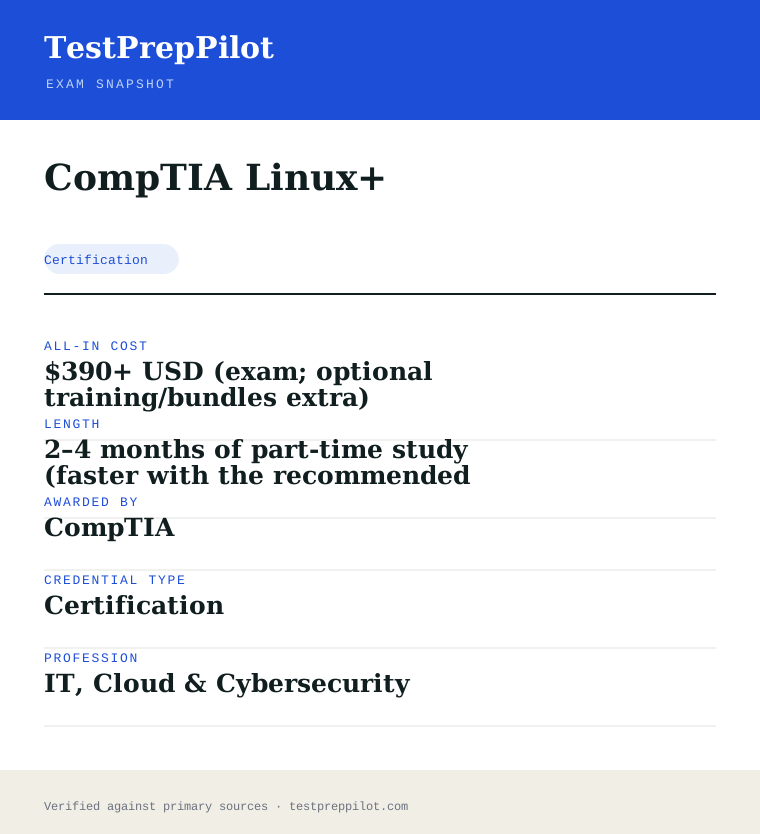
CompTIA Linux+ is a certification credential; awarded by CompTIA; the exam fee is $390 USD (CompTIA list; resellers often $330–369); typical preparation is 2–4 months of part-time study (faster with the recommended 12 months of experience); holders typically earn $65,000 – $95,000.
| Credential | CompTIA Linux+ |
|---|---|
| Abbreviation | Linux+ |
| Type | Certification |
| Profession | IT, Cloud & Cybersecurity |
| Specialty | CompTIA |
| Awarded by | CompTIA |
| Difficulty | Moderate |
| Typical prep time | 2–4 months of part-time study (faster with the recommended 12 months of experience) |
| All-in cost | $390+ USD (exam; optional training/bundles extra) |
| Typical salary range | $65,000 – $95,000 |
| Exam code | XK0-006 |
| Questions | Maximum 90 (multiple-choice + performance-based) |
| Duration | 90 minutes |
| Passing score | 720 (scale 100–900) |
| Delivery | Pearson VUE (center or online) |
| Validity | 3 years, renewable via CE |
| Scope | National / Multi-state |
| Also known as | XK0-006, XK0-005 |
Real questions
Frequently asked questions about the CompTIA Linux+
Is Linux+ the same as LPIC or RHCSA?
No. Linux+ is CompTIA's vendor-neutral, single-exam credential (XK0-006) that maps to ANSI/ISO 17024. LPIC-1 (Linux Professional Institute) requires two exams and is also vendor-neutral, while Red Hat RHCSA is a single performance-only, Red Hat-specific exam. They overlap in topic areas but are distinct credentials with different renewal terms.
Does CompTIA publish a passing score for Linux+?
Yes. The official XK0-006 exam objectives state a passing score of 720 on a scale of 100–900. Results are reported as pass/fail on screen, with a detailed score report available in your CompTIA and Pearson VUE accounts.
How long is Linux+ valid and how do I renew it?
Linux+ is valid for three years from the date of certification. You renew it by earning 50 Continuing Education (CE) credits through CompTIA CertCentral, by earning a higher-level CompTIA certification, or by retaking the exam. There is no separate annual fee while active.
Is Linux+ good for cloud and DevOps careers?
Yes. XK0-006 explicitly covers scripting, Git, Docker/Podman containers, and Ansible/automation, which are foundational for cloud and DevOps roles. It is positioned as a junior cloud/DevOps support engineer credential and pairs well with cloud provider certifications.
Can I take Linux+ online instead of at a test center?
Yes. Linux+ is delivered exclusively through Pearson VUE, which offers both physical test centers and online proctoring via OnVUE. Online testing requires a quiet, private room, a webcam, and a stable internet connection that passes the system check.
Who issues the Linux+ certification?
CompTIA (the Computing Technology Industry Association), a vendor-neutral certifying body. The exam is delivered through Pearson VUE and the credential is ANSI-accredited to ISO/IEC 17024.
How do I renew a CompTIA certification?
Through CompTIA CertCentral: accumulate the required Continuing Education (CE) credits (50 for Linux+) and pay the CE fee, earn a higher CompTIA cert, or retake the current exam. Most CompTIA certs follow the 3-year renewal cycle.
Are CompTIA exam vouchers refundable?
Vouchers are typically non-refundable but may be transferable and carry an expiry date. Optional training products may have a limited refund window. Always review the terms shown at purchase in the CompTIA store.
In short
Is the CompTIA Linux+ worth it?
- Linux+ (XK0-006) is a vendor-neutral, performance-based Linux administration exam — 90 minutes, up to 90 questions, pass mark 720/900.
- Four weighted domains: System Management 32%, Troubleshooting 28%, Security 21%, Scripting/Containers/Automation 19%.
- Standard exam voucher is $390 USD; the cert is valid 3 years and renewed via 50 CEUs in CertCentral.
- Ideal for junior Linux/cloud/DevOps roles and DoD 8140 IAT Level II; complements A+, Network+, Security+, and cloud certs.
Same awarding body
What other credentials does CompTIA award?
Worth comparing
How does the CompTIA Linux+ compare with similar credentials?
Trust
Where does this information come from?
Everything above is taken from the awarding body's own published material. Fees, question counts and domain weights are revised regularly — check the official page before you pay.
- CompTIA Awarding body
- Official CompTIA Linux+ exam page Exam page
Research confidence: high · Last reviewed 2026-08