IT, Cloud & Cybersecurity • Certification
Google Cloud Professional Cloud Developer
Build and deploy cloud-native apps on GCP
Researched and maintained by TestPrepPilot Editorial BoardCloud, IT & cybersecurity certifications desk · Figures last verified August 2026
The short version
What is the Google Cloud Professional Cloud Developer and is it worth it?
The Professional Cloud Developer exam proves you can design, build and deploy cloud-native applications on Google Cloud (Cloud Run, GKE, App Engine, functions) with CI/CD and observability. It is for software engineers and follows the Professional format (2 hours, $200, 2-year validity).
- Directly relevant to app developers
- Covers modern CI/CD and serverless
- Valid 2 years
- Pairs with DevOps cert
What is it?
What exactly is the Google Cloud Professional Cloud Developer?
Build and deploy cloud-native apps on GCP
Professional Cloud Developer validates the ability to design, build, test and deploy applications that run on Google Cloud, using services such as Cloud Run, GKE, App Engine and Cloud Functions, plus CI/CD and developer tooling. It targets software engineers building cloud-native applications and is valid for two years.
Before you book
Who is eligible to sit the Google Cloud Professional Cloud Developer?
Open to anyone aged 18 or older with dev experience.
Who it is for: Software engineers building on Google Cloud
The test itself
What is the format of the Google Cloud Professional Cloud Developer?
The Google Cloud Professional Cloud Developer is administered by Online proctored or testing center and runs 2 hours and contains 50–60 questions.
| Administered by | Online proctored or testing center |
|---|---|
| Questions | 50–60 |
| Time limit | 2 hours |
| Pass mark | Pass/Fail |
| Exam fee | $200 |
| Format | Multiple choice and multiple select |
Content outline
What topics are on the Google Cloud Professional Cloud Developer?
The Google Cloud Professional Cloud Developer covers 4 content domains.
Weightings come from the official exam outline. Study time is best allocated in roughly these proportions rather than evenly across domains.
- Designing cloud-native applications
12-factor, microservices, patterns
- Building and testing apps
Runtimes, GKE, Cloud Run, functions
- Deploying and CI/CD
Cloud Build, Deploy, Artifact Registry
- Integration and observability
Pub/Sub, Monitoring, Trace
Money & time
How much does the Google Cloud Professional Cloud Developer cost?
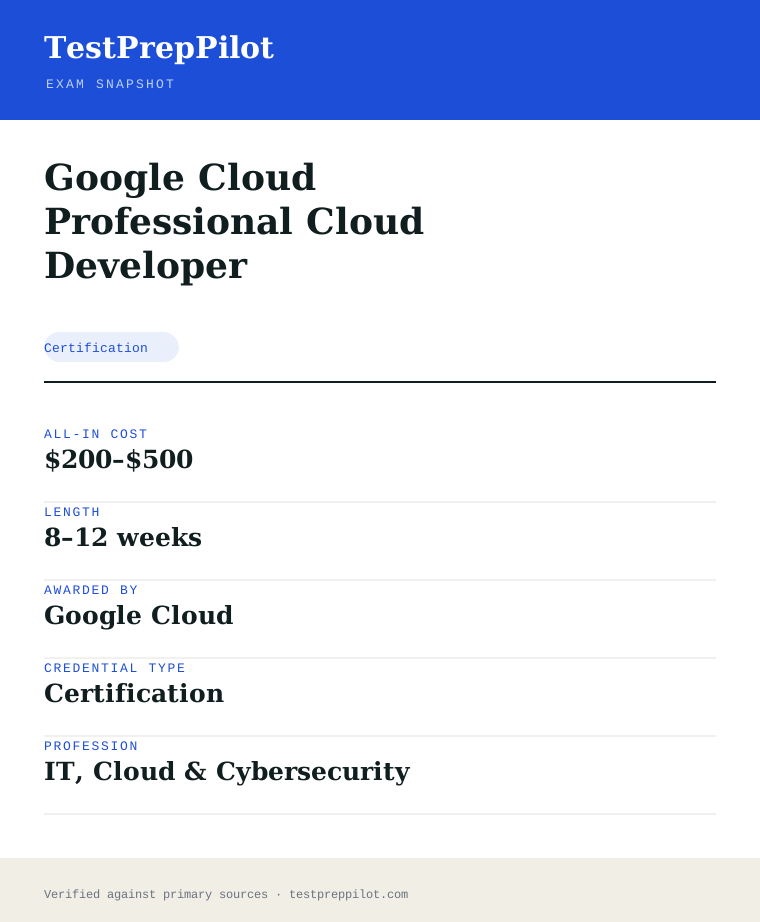
For the Google Cloud Professional Cloud Developer, the exam fee is $200; the all-in cost is typically $200–$500; most candidates spend 8–12 weeks preparing.
Cost breakdown
| Exam fee | $200 |
|---|---|
| Typical total | $200–$500 |
Serverless Free Tier keeps lab cost low.
Timeline
- Build sample apps on Cloud Run/GKE 8–12 weeks
- Book and pass test day
Typical prep: 8–12 weeks
The path
How do you register for the Google Cloud Professional Cloud Developer?
- 1
Create a certification account10 minutes
Sign in to Google Cloud Skills Boost (Webassessor) and confirm your profile and eligible language.
- 2
Register and pay15 minutes
Select the exam, pay the fee, and choose a delivery method. A no-show forfeits the fee.
- 3
Schedule the exam15 minutes
Book an online-proctored slot or a seat at a testing center. Identity verification is required at check-in.
- 4
Sit and passtest day
Complete the multiple-choice / multiple-select items. Most exams report Pass/Fail immediately; the Associate Cloud Engineer shows a scaled 700/1000.
- 5
Maintainper cycle
Foundational and Associate certs are valid 3 years; Professional certs 2 years. Recertify by retaking during the 60-day window before expiry — certified individuals get a 50% renewal discount.
The fine print
What are the retake and renewal rules for the Google Cloud Professional Cloud Developer?
- Proctoring & delivery
- Delivered online with remote proctoring from a private room, or in person at a testing center. A government-issued ID and a room/desk scan (online) are required.
- Retake policy
- After a fail you may retake after 14 days; a second fail requires a 60-day wait; a third fail requires a 12-month wait. The full exam fee is charged on every attempt.
- Score reporting
- Most exams report Pass/Fail with no published numeric cut score. The Associate Cloud Engineer reports a scaled score out of 1000 (pass mark 700). A digital badge and certificate are issued on pass.
- Recertification
- Cloud Digital Leader and Associate Cloud Engineer are valid 3 years; all Professional Cloud certifications are valid 2 years. Recertification is done by retaking and passing the exam during the eligibility window (starting 60 days before expiry). A 50% discount code is issued to certified individuals.
- Refunds & rescheduling
- Fees are paid at booking; a no-show forfeits the fee. Rescheduling and cancellation follow the exam provider’s window and may forfeit the fee if done late.
Context
Google Cloud certification tiers
| Tier | Typical fee | Validity | Audience | |
|---|---|---|---|---|
| Foundational | $99 | 3 years | Business / non-engineering | |
| Associate | $125 | 3 years | Hands-on operators | |
| Professional | $200 | 2 years | Experienced specialists |
What it pays
How much does this credential pay?
$133,080 median for software developers (BLS, May 2024) — the closest occupation to the cloud developer role
The direct salary answer for the Professional Cloud Developer certification is $133,080, the May 2024 median for Software Developers (SOC 15-1252), the closest Bureau of Labor Statistics occupation to the cloud application developer role this exam validates. That is the honest headline, and two caveats belong next to it. First, BLS classifies by job duties rather than by certificate, so the median describes everyone doing software development work, including developers with no Google Cloud skills; developers whose day-to-day work is building and running cloud-native applications on Google Cloud tend to sit above it, while first-year hires sit below. Second, the distribution is worth reading because the role spans a wide band: the lowest 10 percent of software developers earned less than $79,850 and the highest 10 percent more than $211,450, and a Professional Cloud Developer who pairs the credential with real GCP delivery experience moves toward the upper half of that range. The growth picture is genuinely strong: BLS projects software developer employment to grow 16 percent from 2024 to 2034, much faster than the all-occupations average, with roughly 115,000 openings a year, driven by continued expansion in software, cloud and AI-related development. Where the credential shows its value most concretely is in Google Cloud customer organisations and Google Cloud partners, which look for certified developers when staffing cloud-native projects and partner programmes that track certified headcount; recruiters also use the Professional-level Google Cloud certifications as a hard filter for senior developer and cloud-application roles. The honest framing is that this is a professional-level credential — Google recommends 3-plus years of industry experience including one-plus years designing and managing solutions with Google Cloud — so it is an upskilling and signalling credential for working developers rather than an entry point, and its wage value comes from documenting cloud-native development competence that employers increasingly expect rather than from the certificate alone.
| Measure | Figure | Source / note |
|---|---|---|
| Median annual wage — software developers (SOC 15-1252) | $133,080 | BLS Occupational Outlook Handbook, May 2024 wage data. Closest BLS occupation to a cloud developer. |
| Lowest 10 percent | less than $79,850 | BLS OOH Pay tab, May 2024 |
| Highest 10 percent | more than $211,450 | BLS OOH Pay tab, May 2024 |
| Median — all computer and IT occupations | $105,990 | BLS OOH, May 2024 |
| Employment, 2024 / projected change (SOC 15-1252) | 1,693,800 jobs / +16% (2024-34) | BLS OOH; roughly 115,000 openings a year |
Job growth.+16% projected change 2024-34 for software developers (SOC 15-1252, BLS OOH), with roughly 115,000 openings a year — strong demand for developers with cloud-native delivery skills
Source: BLS Occupational Outlook Handbook — Software Developers
Your odds
What are the pass rates?
Google publishes no pass rate and no cut score for the Professional Cloud Developer exam — plan against the format and the pass-fail report instead
There is no published pass rate for the Professional Cloud Developer exam, because Google does not release pass-rate statistics, first-time pass percentages, attempt counts or score distributions for any certification exam, and the pass percentages you will see attached to the credential on forums and bootcamp pages — including the frequently repeated 70 percent figure — are anecdote or inference, not official data. Google also does not publish a cut score for this exam: candidates receive a pass or fail result and a per-domain report, but no numerical threshold, and the often-cited 70 percent is an estimate derived from Google Cloud skills-boost and training material rather than a number Google publishes. What Google does publish is the format, and that is what planning should be built around: the exam is 50 to 60 multiple-choice and multiple-select questions in two hours, available in English and Japanese, with a registration fee of $200 plus applicable tax, delivered through Pearson VUE either online-proctored or at a test centre. The retake policy is published: after a failed attempt there is a 14-day waiting period before you can retake, with no limit on the number of attempts, and the full fee is charged each time. The structural facts that matter for preparation are the pass-fail report format and the domain coverage: Google reports performance by domain rather than a score, so the report on a failed attempt tells you where to aim the retake, and the exam was restructured with a new version launching April 24, 2026, so any preparation material must be checked against the current outline rather than an older version. For a candidate weighing whether the credential is worth it, the honest answer on pass rates is that no official figure exists, and the published numbers that do exist — 50 to 60 questions, two hours, $200, 14-day retake wait — are the ones this page can verify.
Read this before quoting the number.Google publishes no pass rate and no cut score for the Professional Cloud Developer exam; the frequently cited 70 percent threshold is an estimate, not an official figure, and we have deliberately left the pass-rate table empty. What is published and verifiable: 50-60 multiple-choice and multiple-select questions in two hours, $200 registration fee plus applicable tax, pass-fail reporting with per-domain feedback, a 14-day retake wait after a failed attempt with no attempt limit, and a two-year certification validity with renewal within the eligibility period.
Source: Google Cloud — Professional Cloud Developer certification page
Your schedule
How long should I study for it?
90-140 hours over 8-12 weeks of focused study
The study-plan answer for the Professional Cloud Developer exam is 90 to 140 hours over eight to twelve weeks for a developer with the recommended three-plus years of industry experience including one-plus years on Google Cloud, and the first planning fact is to confirm which version you are studying: a new version of the exam launched on April 24, 2026, restructuring the content around four domains — designing highly scalable, secure and reliable cloud-native applications, building and testing applications, configuring applications for deployment, and integrating applications with Google Cloud services — so material written for the older outline leaves real gaps. The exam itself is 50 to 60 multiple-choice and multiple-select questions in two hours, $200 plus tax, delivered through Pearson VUE, with a pass-fail report rather than a numerical score. The plan below front-loads the heaviest domain, designing cloud-native applications — which the restructured outline weights around 36 percent and covers compute platform selection, load balancing, caching, API design, event-driven architecture and data access — then moves through building and testing, configuring for deployment, and integrating with Google Cloud services. The practical backbone is hands-on time in a real Google Cloud project: the exam assumes you have built and deployed applications on Cloud Run, GKE, Cloud Functions and App Engine, configured CI/CD with Cloud Build and Artifact Registry, and integrated Cloud Storage, Firestore, Pub/Sub and Cloud SQL, and a candidate who has actually done that work answers the scenario items differently from one who has only read about it. Budget roughly a third of your hours for deployment and integration labs rather than theory, and run the official Google Cloud practice exam and sample questions as the readiness gate, because the exam rewards having operated the services, not just recognised them.
- Weeks 1-212-14 hrs/week
Cloud-native application design
- Learn compute platform selection: when Cloud Run, GKE, Cloud Functions and App Engine fit, and the trade-offs between them
- Cover load balancing, caching, API design (REST and gRPC) and service orchestration with Workflows, Cloud Tasks and Cloud Scheduler
- Learn event-driven architecture: Eventarc, Pub/Sub and how to choose between them for asynchronous processing
- Start a free Google Cloud project and deploy a simple service to Cloud Run to build the foundation
- Weeks 3-412-14 hrs/week
Building and testing applications
- Set up a development environment: Cloud Shell, Cloud SDK, Cloud Code, and emulators for local development
- Learn the build and test toolchain: Cloud Build, Artifact Registry, and unit and integration testing patterns
- Cover containerised development: Dockerfile patterns, image scanning and Binary Authorization
- Practise writing and running tests against emulated Google Cloud services
- Weeks 5-612-14 hrs/week
Configuring applications for deployment
- Deploy applications to Cloud Run and GKE from source, with triggers from Eventarc and Pub/Sub
- Learn health checks, resource requirements, horizontal pod autoscaling and traffic splitting
- Configure service accounts with least privilege and manage application credentials
- Practise rolling deployments and rollbacks
- Weeks 7-811-13 hrs/week
Integrating with Google Cloud services
- Learn data and storage integration: Cloud SQL, Firestore, Cloud Storage, and when to choose each
- Cover consuming Google Cloud APIs, REST, gRPC and the client libraries
- Learn observability: metrics, logs, traces, Error Reporting and troubleshooting with Google Cloud Observability
- Build one application that uses compute, storage and messaging together end to end
- Weeks 9-1010-12 hrs/week
Practice exams and gap closing
- Take the official Google Cloud practice exam and the sample questions, and log which domains you miss
- Re-build the scenarios you got wrong in your own project
- Two full timed 2-hour practice attempts
- Book through Pearson VUE and run the online-proctoring system test
Adjusting the pace
Working developer with daily Google Cloud exposure.Compress to six to eight weeks. Your day job covers deployment and integration; spend the recovered time on the design domain and on the services you do not touch at work, and verify your study material matches the April 2026 outline.
Developer coming from another cloud.Twelve to fourteen weeks. Your application design and CI/CD skills transfer; the genuinely new material is the Google Cloud service map — Cloud Run versus GKE versus Cloud Functions, Firestore versus Cloud SQL versus Cloud Storage — which needs deliberate lab time.
Studying before the April 2026 restructure.Do not. Confirm the current version first; a course written for the pre-April-2026 outline teaches a superseded structure and leaves you exposed on the restructured domains.
How to study
How do I prepare most effectively?
The strategies that move a Professional Cloud Developer score are the ones that force deployment in a real Google Cloud project, because the exam assumes you have built and run cloud-native applications and the scenario items punish candidates who have only read about the services. The single highest-yield habit is to build one end-to-end application in a real Google Cloud project — deploy to Cloud Run, add a Firestore or Cloud SQL data layer, wire in Pub/Sub or Eventarc, and configure observability — because the exam’s integration and deployment scenarios reward exactly that executed loop, and Google’s own guidance stresses hands-on experience over theory. Second, learn the service-selection decisions rather than the service menus: the exam frequently asks which service fits a described workload — Cloud Run versus GKE versus Cloud Functions, Firestore versus Cloud SQL versus Cloud Storage, Pub/Sub versus Eventarc versus Cloud Tasks — and the candidates who do well have rehearsed those decision rules, not memorised feature lists. Third, use the official Google Cloud practice exam and sample questions as the readiness gate, because they are the closest available proxy for the real item style and difficulty, and log every miss by domain. Fourth, practise the CI/CD loop deliberately: Cloud Build, Artifact Registry, triggers and deployment pipelines are a core part of the blueprint, and building a pipeline that deploys to Cloud Run from a repository is a finite, high-yield lab. Fifth, rehearse the 50-60 questions in two hours as a pacing exercise — that is roughly two minutes per question, which is comfortable until a long scenario appears, so practise flagging and moving. Finally, verify your material matches the April 24, 2026 version of the exam, because the restructure changed the domain structure and any course recorded before it teaches a superseded outline.
Build one end-to-end application in a real GCP project
Deploy to Cloud Run, add a Firestore or Cloud SQL data layer, wire in Pub/Sub or Eventarc, and configure observability. The exam’s integration and deployment scenarios reward exactly this executed loop, and Google’s own guidance stresses hands-on experience.
Learn the service-selection decisions, not the service menus
The exam asks which service fits a described workload — Cloud Run versus GKE versus Cloud Functions, Firestore versus Cloud SQL versus Cloud Storage. Rehearse those decision rules rather than memorising feature lists.
Use the official practice exam as the readiness gate
Google’s practice exam and sample questions are the closest proxy for the real item style and difficulty. Take them, log every miss by domain, and re-build the scenarios you got wrong in your own project.
Practise the CI/CD loop deliberately
Cloud Build, Artifact Registry, triggers and deployment pipelines are core to the blueprint. Building a pipeline that deploys to Cloud Run from a repository is a finite, high-yield lab worth repeating.
Rehearse the two-hour pacing
50-60 questions in two hours is roughly two minutes per question, which is comfortable until a long scenario appears. Practise flagging and moving, and keep the pass-fail goal in mind rather than trying to count a percentage.
Verify your material matches the April 2026 version
A new version launched April 24, 2026 with a restructured domain outline. Confirm the version of any course or question bank before buying, and read the current exam guide yourself.
What to buy
Which study resources are worth paying for?
The buying logic for the Professional Cloud Developer exam is anchored by Google’s own free material, and the rational stack for most candidates is free: the official exam guide and study materials on Google Cloud Skill Boost, the official practice exam, the sample questions, and hands-on time in a free-tier Google Cloud project cover the content and the practical backbone the exam demands. The single justified spend for most candidates is cloud consumption for labs — a free-tier project covers much of the blueprint, but heavier deployment and integration scenarios benefit from a paid project with budget controls, typically $20-60 across a study window if you delete resources between sessions. On the paid side, the tiers are familiar: Google Cloud’s own paid training paths and instructor-led courses sit at the premium end and are mostly employer-funded; third-party video courses on Udemy or the major cloud-training platforms run $15-40 on sale; and practice-test banks range from $20 to $90, with the caveat that no third-party bank is as well-calibrated as the official practice exam, so treat third-party scores as weak signals and the official materials as the gate. Google Cloud Skill Boost (formerly Qwiklabs) provides hands-on labs on a pay-as-you-go or subscription basis and is the best paid option for candidates who lack a personal cloud project. The footnote anchoring the comparison: prices below are USD list checked 2026-08 and change by provider, region and sale status; the exam registration fee is $200 plus tax; we take no commission from any provider and rank nothing by commercial relationship.
| Resource | Price | Format | Best for |
|---|---|---|---|
| Official exam guide and study materials (Google Cloud) | Free | Exam guide, study plan and documentation links | The blueprint itself; confirm it is the current post-April-2026 version |
| Official practice exam and sample questions | Free | Online practice exam and sample items | The readiness gate — closest proxy for real item style and difficulty |
| Google Cloud free-tier project | Free for qualifying usage | Live cloud environment | The hands-on backbone — deploy a service and build the integration loop |
| Paid Google Cloud project for heavier labs | $20-60 across a study window if you delete resources | Live cloud environment with budget alerts | Deployment, CI/CD and integration scenarios beyond the free tier |
| Google Cloud Skill Boost labs | Pay-as-you-go or subscription | Hands-on labs | Candidates without a personal cloud project who need structured practice |
| Third-party video course (Udemy and similar) | ~$15-40 on sale | Video instruction | A structured narrative; confirm it covers the April 2026 outline |
| Third-party practice tests | ~$20-90 | Question banks | Supplementary volume; treat scores as weaker signals than the official practice exam |
| Official instructor-led training | Premium, mostly employer-funded | Instructor-led classes | Team or employer-funded candidates who want a schedule and an instructor |
Prices checked 2026-08-05, USD list before tax and regional adjustment; Udemy and third-party prices vary widely with sale status. The exam registration fee is $200 plus applicable tax. Confirm any third-party material covers the post-April-24-2026 version. We take no commission from any provider and rank nothing by commercial relationship.
Avoid these
What mistakes do candidates most often make?
The dominant mistakes around the Professional Cloud Developer exam are version errors, hands-on gaps and reporting misreads, and the first one is the most expensive in 2026: studying material written before the April 24, 2026 exam restructure, when the domain structure changed and old courses teach a superseded outline. The second is preparing from documentation and video without ever deploying into a real Google Cloud project — the exam assumes you have built and run cloud-native applications, and a candidate who has never deployed to Cloud Run or wired up Pub/Sub fails the deployment and integration scenarios despite knowing the theory. The third is misreading the reporting model: the exam returns a pass-fail result with per-domain feedback, not a numerical score, so candidates who hunt for a cut score or try to count a percentage of correct answers are chasing something Google does not publish; the useful read is the domain breakdown on a failed attempt, which tells you where to aim the retake. The fourth is assuming the frequently cited 70 percent threshold is official when it is an estimate, and planning against it as if it were a published cut score. The fifth is neglecting the service-selection decision rules — Cloud Run versus GKE versus Cloud Functions, Firestore versus Cloud SQL versus Cloud Storage — which the scenario items lean on heavily, and instead memorising service feature lists. The sixth is ignoring the 14-day retake wait and the $200 fee structure, which makes a rushed first attempt an expensive mistake. The seventh is treating third-party question banks as the readiness gate when the official practice exam is the better-calibrated resource. Finally, some candidates forget the certification expires after two years and must be renewed within the eligibility period, and let it lapse into a full re-sit.
✕Studying pre-April-2026 material
✓A new version launched April 24, 2026 with a restructured domain outline. Verify the version of any course or question bank before buying, and read the current exam guide to check the domain structure.
✕Preparing from docs and video without deploying
✓The exam assumes you have built and run cloud-native applications. Deploy at least one end-to-end application — Cloud Run plus a data layer plus Pub/Sub plus observability — in a real Google Cloud project before you book.
✕Hunting for a cut score that Google does not publish
✓The exam returns a pass-fail result with per-domain feedback, not a numerical score. Use the domain breakdown from a failed attempt to aim the retake, and stop trying to count a percentage of correct answers.
✕Treating the 70 percent figure as official
✓The often-cited 70 percent is an estimate, not a published cut score. Plan against the format Google publishes — 50-60 questions, two hours, pass-fail reporting — rather than a threshold Google has not stated.
✕Memorising service menus instead of selection rules
✓The scenario items ask which service fits a workload. Rehearse the decision rules — Cloud Run versus GKE versus Cloud Functions, Firestore versus Cloud SQL versus Cloud Storage, Pub/Sub versus Eventarc versus Cloud Tasks — with the trade-offs, not the feature lists.
✕Booking before you are ready and eating the retake wait
✓A failed attempt costs the full $200 fee and triggers a 14-day wait before retaking. Use the official practice exam as the readiness gate and only book when you pass it consistently.
✕Trusting third-party banks over the official practice exam
✓No third-party bank is as well-calibrated as Google’s official practice exam and sample questions. Use the official materials as the gate and treat third-party scores as supplementary signals only.
✕Letting the certification lapse after two years
✓The Professional Cloud Developer certification is valid for two years and renews within the renewal eligibility period on Google’s certification platform. Diary the expiry and start the renewal early; letting it lapse means a full $200 re-sit.
What you'll face
What question types will I see?
The Professional Cloud Developer exam is 50 to 60 multiple-choice and multiple-select questions in two hours, delivered through Pearson VUE either online-proctored or at a test centre, with a pass-fail report plus per-domain feedback rather than a numerical score, and Google does not publish a cut score. The four domains of the post-April-2026 version are designing highly scalable, secure and reliable cloud-native applications, building and testing applications, configuring cloud-native applications for deployment, and integrating applications with Google Cloud services, with the design domain carrying the heaviest weight — around 36 percent — followed by integration, building and testing, and deployment configuration. The distinguishing feature of the paper is that most items are scenario-based: a described application situation — a latency requirement, a cost constraint, a reliability target, a data-integrity concern — followed by which service, architecture or configuration the developer should choose, and the answer usually hinges on the service-selection decision rules and the trade-offs between Google Cloud services rather than on remembering a specific command or flag. Expect items that ask you to choose between Cloud Run, GKE, Cloud Functions and App Engine for a described workload; between Firestore, Cloud SQL, Cloud Storage and Spanner for a data requirement; and between Pub/Sub, Eventarc and Cloud Tasks for asynchronous integration, plus CI/CD and observability scenarios around Cloud Build, Artifact Registry and Google Cloud Observability. The pacing math is roughly two minutes per question, which is comfortable until a long scenario appears, so a steady sweep with flagging is the winning rhythm. The samples below are editor-written illustrations of the published format and domains, not live exam items.
Scenario-based items asking which Google Cloud service, architecture or configuration fits a described workload. The answer usually hinges on service-selection trade-offs rather than recall.
Items requiring several correct answers to be selected. No partial credit, so evaluate each option independently.
Choose between Cloud Run, GKE, Cloud Functions and App Engine for compute; Firestore, Cloud SQL, Cloud Storage and Spanner for data; Pub/Sub, Eventarc and Cloud Tasks for async integration.
Cloud Build, Artifact Registry, deployment pipelines, service accounts, metrics, logs and traces. These reward having actually configured the pipeline and the monitoring.
Try these
Q1A development team must deploy a containerised application that receives bursts of HTTP traffic and must scale to zero during quiet periods to minimise cost. The application is stateless and has no requirement for long-running connections. Which compute option is most appropriate?
Answer:A
Cloud Run is the fully managed serverless container option that supports scale-to-zero, which is exactly the cost-minimisation clause in the stem: it scales containers from zero in quiet periods and up under bursts, and it fits stateless HTTP workloads without long-running connections. B keeps a fixed node pool running even when idle, which violates the minimise-cost requirement unless autoscaling is configured to scale the pool down — and even then it carries cluster-management overhead the stem does not justify. C uses preemptible instances, which can be terminated by Google at any time, so it is unsuitable for bursty production HTTP traffic where availability matters. D offers App Engine’s managed platform but manual scaling leaves capacity decisions to the team, and the scale-to-zero requirement points to the serverless option. When the stem pairs bursty HTTP traffic with scale-to-zero and cost, Cloud Run is the answer.
Q2An application must store structured data with strong consistency and support complex relational queries, and the team expects modest read and write volume that can grow. Which data service is the best fit?
Answer:A
Cloud SQL provides a managed relational database with strong consistency and full SQL support for complex relational queries, which is the combination the stem demands. B is a NoSQL document database optimised for horizontal scale and flexible schemas; it supports queries but is not a relational engine, so complex relational joins and transactions of the kind the stem implies are not its strength. C is object storage, not a queryable database. D is a messaging service, which is unrelated to structured data storage. The stem’s two requirements — strong consistency and complex relational queries — map directly to a managed relational database, and Cloud SQL is the appropriate Google Cloud service for that profile at the moderate scale described.
Q3A team deploys a new version of a Cloud Run service and wants to route a small percentage of traffic to the new revision to validate it in production before a full rollout, with the ability to roll back instantly if errors appear. Which Cloud Run capability should be used?
Answer:A
Cloud Run supports traffic splitting between revisions, which lets a team route a percentage of traffic to the new revision for a canary-style validation and adjust or roll back the split instantly without redeploying. A is exactly that mechanism. B creates a separate service with its own URL, which does not route a controlled percentage of the main service’s traffic. C replaces the service on every build, which removes the canary staging the stem requires. D deletes a revision, which is an irreversible action and not a validation mechanism. When the stem describes incremental rollout with instant rollback, Cloud Run revision traffic splitting is the capability the exam expects you to name.
Samples are editor-written illustrations of the published blueprint, not live exam items.
The big day
What should I expect on exam day?
The Professional Cloud Developer exam is 50 to 60 questions in two hours, delivered through Pearson VUE either online-proctored or at a test centre, with a registration fee of $200 plus applicable tax, and the direct exam-day answer is a pass-fail report plus per-domain feedback rather than a numerical score, with results typically available within a few days through the Google Cloud certification platform. The test centre versus online decision is the first real choice. A centre gives you a supervised workstation and a physical erasable whiteboard — genuinely useful for sketching an architecture or a service-selection comparison — and no room scan; the online option gives you your own desk but a stricter environment, with a room scan, a clear desk, no second monitors, and no physical scratch paper unless it was explicitly approved for your booking. Check what your booking allows rather than assuming, because the rules have tightened across proctoring providers and an item that was acceptable a year ago can end your session now. Whichever you choose, arrive or launch check-in thirty minutes early; online check-in can take twenty minutes on a bad day, and a late check-in is a forfeited fee. Inside the exam, the pacing math is roughly two minutes per question, so the winning rhythm is a steady sweep with flagging, using the service-selection decision rules you rehearsed — underline the constraint in each scenario stem before reading the options. If you fail, the published retake rule is a 14-day wait before your next attempt, with no limit on attempts and the full fee charged each time, so a rushed first attempt is an expensive mistake; use the per-domain feedback from the report to target the retake.
Bring
- Government-issued photo ID with your name matching your certification profile exactly — a mismatch is a common and expensive turn-away
- A second form of ID at the test centre if your primary is not a passport or driving licence; check your Pearson VUE confirmation for what your country requires
- Your Pearson VUE confirmation and exam registration number
- At a test centre: nothing else; everything else goes into a locker
- For online testing: the phone used for check-in photo upload — it goes out of reach once check-in completes
- For online testing: a physical whiteboard with an erasable marker, only if explicitly permitted on your booking
Leave at home
- Phones, smartwatches, fitness trackers and earbuds — locker at a centre, out of the room entirely for online proctoring
- Your own paper, pens, notebooks and sticky notes
- Second monitors — online proctoring requires a single display, and a disconnected second monitor on the desk is still a violation
- Bags, coats, hats and any headwear not worn for religious reasons
- Food and drink beyond what the centre permits
- Anyone else in the room for online testing — the proctor ends the session if another person is heard or seen
How the day runs
Rules in the room
- 50-60 multiple-choice and multiple-select questions in two hours.
- Pass-fail reporting with per-domain feedback; Google does not publish a cut score or pass rate.
- Delivered through Pearson VUE, online-proctored or at a test centre.
- Registration fee is $200 plus applicable tax, charged again on every retake.
- After a failed attempt there is a 14-day waiting period before the next attempt; there is no limit on the number of attempts.
- No scratch paper of your own — centres supply an erasable whiteboard; online candidates get no paper unless a physical whiteboard was explicitly approved on the booking.
- The certification is valid for two years and renews within the renewal eligibility period.
Afterwards.Results are typically available within a few days through the Google Cloud certification platform, delivered as a pass or fail together with per-domain feedback; Google does not provide a numerical score, and the domain feedback on a failed attempt is the most useful artefact the exam produces, because it tells you which of the four domains pulled you below the pass threshold. If you passed, you can claim the digital badge and certificate from the Google Cloud certification portal, and the certification is valid for two years with renewal handled through the same platform within the renewal eligibility period — diary the expiry and start the renewal early, because letting it lapse means a full $200 re-sit and a fresh exam. If you failed, the published rule is a 14-day wait before the next attempt with the full fee charged again and no limit on attempts, so resist the impulse to re-sit as soon as the window opens on the same preparation. Use the domain breakdown to identify the one or two areas that failed you — typically the design or integration domains — and spend the 14 days rebuilding those scenarios in a real Google Cloud project before the retake, because a repeated attempt on the same knowledge is how a $200 exam becomes a $400 one.
Reference
What are the key facts about the Google Cloud Professional Cloud Developer?
Google Cloud Professional Cloud Developer is a certification credential; awarded by Google Cloud; the exam fee is $200; typical preparation is 8–12 weeks; holders typically earn $130,000–$180,000.
| Credential | Google Cloud Professional Cloud Developer |
|---|---|
| Abbreviation | PCD |
| Type | Certification |
| Profession | IT, Cloud & Cybersecurity |
| Specialty | Google Cloud & Google |
| Awarded by | Google Cloud |
| Difficulty | Hard |
| Typical prep time | 8–12 weeks |
| All-in cost | $200–$500 |
| Typical salary range | $130,000–$180,000 |
| Delivery | Online proctored or testing center |
| Level | Professional |
| Validity | 2 years |
| Focus | Application build and deploy |
| Scope | National / Multi-state |
| Also known as | Professional Cloud Developer |
Real questions
Frequently asked questions about the Google Cloud Professional Cloud Developer
What services should I know?
Cloud Run and GKE for compute, App Engine and Cloud Functions for serverless, plus Cloud Build/Deploy and Artifact Registry for CI/CD and Pub/Sub, Cloud Tasks and observability tooling for integration.
How is this different from DevOps Engineer?
Cloud Developer centers on writing and deploying application code; DevOps Engineer centers on CI/CD, SRE and delivery pipeline reliability. They overlap on deployment but differ in emphasis.
What coding is expected?
You should be comfortable reading and reasoning about application code and deployment config, but the exam is multiple-choice/scenario rather than a live coding lab.
Does it expire?
Yes — two years; recertify by retaking the exam during your eligibility window.
Do Google Cloud certifications expire?
Yes. Cloud Digital Leader and Associate Cloud Engineer are valid for three years; Professional certifications are valid for two years. You recertify by retaking the exam, and certified individuals receive a 50% discount on the renewal attempt.
What score do I need to pass?
Most Google Cloud exams are reported as Pass/Fail with no published numeric cut score; the Associate Cloud Engineer uses a scaled 700/1000. A common, unofficial study target is around 70%.
In short
Is the Google Cloud Professional Cloud Developer worth it?
- Professional cert for cloud-native application development on GCP.
- Covers Cloud Run, GKE, App Engine, functions and CI/CD.
- Focus on build, deploy and observability.
- Valid 2 years; $200 exam fee.
Same awarding body
What other credentials does Google Cloud award?
Worth comparing
How does the Google Cloud Professional Cloud Developer compare with similar credentials?
Trust
Where does this information come from?
Everything above is taken from the awarding body's own published material. Fees, question counts and domain weights are revised regularly — check the official page before you pay.
- Google Cloud Awarding body
- Official Google Cloud Professional Cloud Developer exam page Exam page
Research confidence: medium · Last reviewed 2026-08