IT, Cloud & Cybersecurity • Certification
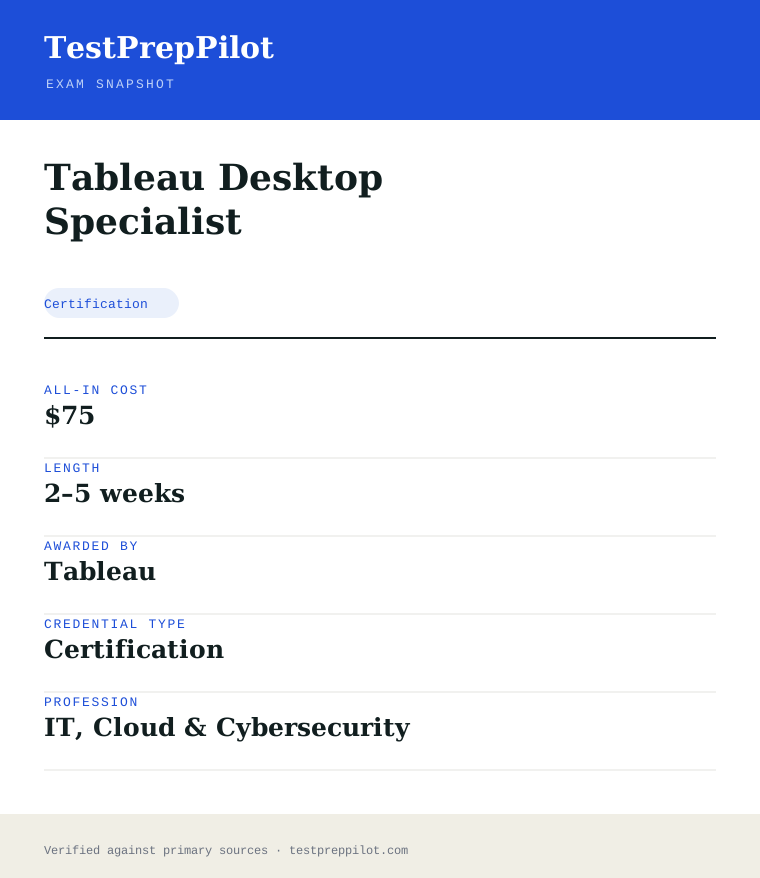
Tableau Desktop Specialist
The approachable entry into Tableau
Researched and maintained by TestPrepPilot Editorial BoardData analytics & business-intelligence desk · Figures last verified August 2026
The short version
What is the Tableau Desktop Specialist and is it worth it?
Tableau Desktop Specialist / Foundations is a 45-question (40 scored + 5 unscored) exam in 60 minutes, $75, ~70–75% pass, free retake, no expiration, via Trailhead Academy / Pearson VUE.
- No expiration
- Free retake
- Low $75 cost
- Beginner-friendly
What is it?
What exactly is the Tableau Desktop Specialist?
The approachable entry into Tableau
The Tableau Desktop Specialist (now branded Desktop Foundations) is Tableau’s entry-level exam covering connecting to data, building basic charts, calculations, dashboards and sharing work. It is a 45-question exam (40 scored + 5 unscored) in 60 minutes, costs $75, requires roughly a 70–75% pass, offers a free retake, and does not expire — making it a low-risk first Tableau credential. Delivery is via the Salesforce Trailhead Academy / Pearson VUE.
Before you book
Who is eligible to sit the Tableau Desktop Specialist?
None
Who it is for: Tableau beginners and students
The test itself
What is the format of the Tableau Desktop Specialist?
The Tableau Desktop Specialist is administered by Pearson VUE via Trailhead Academy and runs 90 min, contains 60 (70% passing) questions and requires ~70–75% to pass.
| Administered by | Pearson VUE via Trailhead Academy |
|---|---|
| Questions | 60 (70% passing) |
| Time limit | 90 min |
| Pass mark | ~70–75% |
| Exam fee | ~$250 |
| Format | Multiple choice |
Content outline
What topics are on the Tableau Desktop Specialist?
The Tableau Desktop Specialist covers 5 content domains.
Weightings come from the official exam outline. Study time is best allocated in roughly these proportions rather than evenly across domains.
- Connecting to data
Files, databases, joins
- Building charts
Marks, shelves, chart types
- Calculations
Calculated fields, basic functions
- Dashboards
Layout, actions, filters
- Sharing
Tableau Public, Server, Cloud
Money & time
How much does the Tableau Desktop Specialist cost?
For the Tableau Desktop Specialist, the exam fee is ~$250; the all-in cost is typically $75; most candidates spend 2–5 weeks preparing.
Cost breakdown
| Exam fee | $75 |
|---|---|
| Typical total | $75 |
Free retake; free Tableau Public covers most practice.
Timeline
- Practice on Tableau Public 2–5 weeks
- Pass the Desktop exam test day
Typical prep: 2–5 weeks
The path
How do you register for the Tableau Desktop Specialist?
- 1
Create a Trailhead / Tableau account5 minutes
Register on Salesforce Trailhead Academy and locate the Tableau certification catalog.
- 2
Schedule through Pearson VUE10 minutes
Book a slot via the Trailhead Academy portal; pay the exam fee at scheduling.
- 3
Prepare with free resourcesstudy phase
Use Tableau Public, free eLearning, and the exam prep guides for your target credential.
- 4
Sit the examtest day
Complete a multiple-choice and (for most) hands-on lab exam within the allotted time.
- 5
Maintainper cycle
Most Tableau credentials are valid two years; the Desktop Foundations exam does not expire.
The fine print
What are the retake and renewal rules for the Tableau Desktop Specialist?
- Proctoring & delivery
- Delivered through Pearson VUE at test centers or online proctored, scheduled via the Salesforce Trailhead Academy portal. Hands-on lab components run in a proctored Tableau environment.
- Retake policy
- If you fail, you may retake after a waiting period and pay the full fee each attempt. The Desktop Specialist / Foundations exam offers a free retake.
- Score reporting
- Tableau reports pass/fail with scaled scoring; the Data Analyst exam requires roughly 65%. Results are delivered through the Trailhead Academy portal.
- Recertification
- Most Tableau certifications are valid for two years and renewed by passing the current exam. The Desktop Foundations (formerly Specialist) exam does not expire.
- Refunds & rescheduling
- Cancellations or reschedules inside 48 hours of the appointment forfeit the fee; no-shows are charged in full. The Desktop Foundations exam has a free retake policy.
Context
Tableau certification exams (2026)
| Exam | Format | Fee | |
|---|---|---|---|
| Desktop Specialist / Foundations | MCQ, no expiry | $75 | |
| Data Analyst | MCQ + lab | $200 | |
| Consultant | MCQ + lab | $200 | |
| Architect (incl. server) | MCQ + lab | $400 |
What it pays
How much does this credential pay?
Tableau Desktop Specialist evidences analytics-viz skill: data scientists earned a $112,590 median in May 2024 (BLS)
The Tableau Desktop Specialist certification evidences foundational proficiency with Tableau Desktop - connecting to data, building worksheets and dashboards, and creating visualizations - which is one of the most widely used analytics and business-intelligence tools in the market. It is a vendor certification rather than a job license, so no single BLS SOC code attaches to it; the salary story belongs to the data and analytics occupations that use it. BLS reported that data scientists (SOC 15-2051) earned a median of $112,590 in May 2024, projected to grow 22 percent from 2024 to 2034, and statisticians (15-2041) about $99,460; analytics, business-intelligence and data-visualization roles that list Tableau sit in these ranges, and Tableau proficiency is a common requirement in analyst job postings. The structural point is that the Desktop Specialist is Tableau’s entry-level certification (succeeding the retired Desktop Qualified Associate), and it evidences hands-on tool skill - data connections, table calculations, filters, charts and dashboarding - which is exactly what analytics teams hire for; it is also the natural precursor to the higher Tableau certifications (Data Analyst, Server Certified Associate, and the Architect/Consultant tiers). BLS classifies workers by occupation, not certifications, so no certificate maps to a specific wage; the value is the tool-specific signal in a market where visualization and analytics skills differentiate candidates. The exam is performance-based (the candidate builds solutions in Tableau Desktop during the test), runs 60 questions in 90 minutes (verify the current format), passes at 70 percent, and costs about $250.
| Measure | Figure | Source / note |
|---|---|---|
| Data scientists median, May 2024 | $112,590 | BLS OEWS, SOC 15-2051 |
| Statisticians median, May 2024 | ~$99,460 | BLS OEWS, SOC 15-2041 |
| All-occupation median, May 2024 | $49,500 | BLS OEWS |
| Desktop Specialist exam | 60 questions / 90 min (verify) | Tableau, 70% passing |
Job growth.Data-scientist employment is projected to grow 22 percent from 2024 to 2034; Tableau remains a leading analytics tool in job postings.
Your odds
What are the pass rates?
Tableau Desktop Specialist requires 70 percent on the exam; Tableau publishes no pass rates
Tableau does not publish pass rates for its certifications, but the assessment mechanics are public. The Tableau Desktop Specialist exam is a performance-based, computer-based test: the candidate answers questions while working in Tableau Desktop, with the exam software recording actions; the current format is 60 questions in 90 minutes with a passing score of 70 percent (verify the current question count, time and passing line on the Tableau certification page, as Tableau has updated the exam over the years). The exam covers the published skills areas: connecting to data (data source types, connections, data preparation), building data visualizations (marks, chart types, axes, filters, sorting), and analyzing data (groups, sets, calculations, table calculations, parameters), plus dashboard and story creation. Because the exam is performance-based, candidates must know where features live in Tableau Desktop and complete the actions, not just recall concepts. The exam is delivered by Pearson VUE online or at test centers, costs about $250 (verify current pricing), and the certification does not have a mandatory expiry under Tableau’s current policy (verify the current validity, as Tableau has reviewed its certification lifecycle). The honest summary is that the passing bar is 70 percent on a performance-based exam, no pass-rate data exists, and the published exam guide with the skills areas is the authoritative preparation blueprint.
Read this before quoting the number.Tableau publishes no pass rates; the exam requires 70% and is performance-based in Tableau Desktop (verify the current format and validity).
Your schedule
How long should I study for it?
30-100 hours over 2-4 weeks of focused study
A realistic Tableau Desktop Specialist plan runs 30-60 hours over 2-4 weeks for an analyst with some Tableau exposure, and 60-100 hours for a newcomer. The exam is performance-based, so preparation is about doing the work in Tableau Desktop. Week 1: download Tableau Desktop (the free trial or the free Tableau Public, which covers most features), review the published exam guide with the skills areas, and take a baseline - build a basic worksheet and dashboard to see where you stand; most candidates discover gaps in the features they rarely use (table calculations, sets, parameters, LOD expressions at the basics). Weeks 2-3: work through the skills areas with hands-on practice - connect to multiple data sources and prepare data, build the chart types and use marks, axes, filters and sorting; practice calculations (calculated fields, table calculations) and the analysis features (groups, sets, parameters); then build dashboards and stories. Week 4: take the official practice exam and sample questions, drill the exposed gaps, and take the real exam. The dominant resources are the Tableau free training videos and the official eLearning (much of it free), the official practice exam, and hands-on practice with public datasets; the exam fee is about $250, and Tableau’s free training path covers the scope.
- Week 18
Baseline and exam guide
- Install Tableau Desktop/Public
- Review the skills areas; build a baseline viz
- Weeks 2-335
Skills-area practice
- Data connections and prep
- Calculations, sets, parameters, dashboards
- Week 412
Practice exam and real exam
- Official practice exam
- Drill gaps; take the real exam
Adjusting the pace
Beginner path.Add 2 weeks of daily Tableau practice before the formal plan if the baseline is weak.
Career path.The Desktop Specialist leads to the Data Analyst and Server certifications for the analytics career track.
How to study
How do I prepare most effectively?
The most effective Tableau Desktop Specialist strategies are hands-on and skills-driven. Strategy one: practice in Tableau Desktop daily - the exam is performance-based and rewards knowing exactly where features live, and candidates who study screenshots without doing the work underperform on the timed tasks. Strategy two: use the published exam guide as the checklist - the skills areas define the scope, and candidates who work through them systematically cover the features they rarely use (table calculations, sets, parameters, LOD basics). Strategy three: master the calculation and analysis features, because calculated fields and table calculations are the most common gap for self-taught users and a heavy share of the exam. Strategy four: learn the data-connection and preparation steps - connecting to multiple data sources, joins and blends at the basics, and data-pane organization - because data-connection items open the exam. Strategy five: practice dashboard and story creation, because the exam tests assembling worksheets into dashboards with actions and filters. Strategy six: use the official practice exam for the final week, because it replicates the performance format and the timing, and it is the closest predictor of readiness.
Practice in Tableau daily
The performance-based exam rewards interface fluency.
Work the exam guide checklist
The skills areas define the scope.
Master calculations
Calculated fields and table calculations are the common gap.
Learn data connections
Connections and prep open the exam.
Use the official practice exam
The closest format match for the final week.
What to buy
Which study resources are worth paying for?
The Tableau Desktop Specialist resource market has a strong free core. Tableau provides free training videos and a large share of the eLearning free (the Tableau eLearning platform includes free content, with the full subscription paid), plus the free exam guide and the official practice exam (verify current pricing for the practice exam, commonly modest). Hands-on practice requires Tableau Desktop (the free 14-day trial or the permanently free Tableau Public, which covers most features for practice) - so the learning stack can cost nothing beyond the exam fee. Commercial prep courses and question banks ($50-$400) add structure and practice volume, and the honest caveat is that only hands-on practice matches the performance format. The exam fee is about $250 (verify current pricing). The honest ranking: the free training videos and eLearning, Tableau Public or the trial for practice, the official practice exam, and a course only for structured learners. Prices here are current as of 2025-26 and change annually.
| Resource | Price | Format | Best for |
|---|---|---|---|
| Tableau free training videos | Free | Online | Feature and skill tutorials |
| Tableau Public / Desktop trial | Free | Desktop | The hands-on practice surface |
| Official practice exam | Modest fee (verify) | Online | Format calibration |
| Commercial course / question bank | $50-$400 | Online | Structure and practice volume |
Prices dated 2025-26; the Desktop Specialist exam fee is ~$250. No commission-based ranking.
Avoid these
What mistakes do candidates most often make?
The most common Tableau Desktop Specialist mistakes come from studying instead of doing. Mistake one: reading about Tableau or watching videos without building in the tool; the exam is performance-based, and candidates who cannot navigate the interface quickly run out of time. Mistake two: skipping the calculations; calculated fields and table calculations are the most common gap and a heavy share of the exam, and candidates who avoid the math lose the largest cluster. Mistake three: ignoring the data-connection and preparation items; the exam opens with data skills, and candidates who only practiced visualization are surprised. Mistake four: practicing without the official exam guide; the skills areas define the scope, and candidates who practice what they already know miss the tested features they rarely use. Mistake five: assuming dashboard skills from worksheet practice; the exam tests assembling dashboards with actions and filters, which is a distinct skill. Mistake six: ignoring the format updates; Tableau has revised the certification over the years, and candidates should verify the current exam name, format and validity on the Tableau certification page.
✕Studying without building
✓Practice in Tableau Desktop daily.
✕Skipping calculations
✓Calculated fields and table calculations are the common gap.
✕Ignoring data preparation
✓Connections and prep open the exam.
✕Practicing without the guide
✓Work the published skills areas as the checklist.
✕Missing dashboard practice
✓Dashboards with actions and filters are a distinct skill.
What you'll face
What question types will I see?
The Tableau Desktop Specialist exam is a performance-based, computer-based test (currently 60 questions in 90 minutes with a 70 percent passing line; verify the current format). The skills areas: connecting to and preparing data, exploring and analyzing data (marks, chart types, filters, sorting), and sharing insights (dashboards, stories, and the analysis features of groups, sets, calculations and parameters). The exam is delivered by Pearson VUE. Samples below are editor-written illustrations of the published skills areas, not live exam items.
Data sources, connections, and preparation.
Marks, chart types, axes, filters, sorting.
Groups, sets, calculations, table calculations, parameters.
Dashboards, stories, and worksheet organization.
Try these
Q1A view shows sales by region. The analyst wants to see the share of each region within the total for each year. Which feature computes this most directly?
Answer:A
A table calculation with percent-of-total computes each region’s share within the total; filters, blends and stories serve different purposes.
Q2A worksheet needs to show only the top 5 products by profit. Which approach is most appropriate?
Answer:A
A top-N filter limits the view to the top products by the measure; the other options do not restrict the displayed rows.
Q3An analyst connects two tables that share a common field to combine them for analysis. Which feature performs this in Tableau Desktop?
Answer:A
Joins combine tables at the data-source level and blends combine them at the worksheet level using the common field; the other options are not data-combination features.
Samples are editor-written illustrations of the published skills areas, not live exam items.
The big day
What should I expect on exam day?
The Tableau Desktop Specialist exam is delivered by Pearson VUE at test centers and online with a proctor. At a test center, arrive 30 minutes early with a valid ID; the exam runs about 90 minutes on the center’s computer with Tableau Desktop installed, and candidates complete the performance-based tasks in the application while the exam software records the actions. For online delivery, complete the Pearson VUE system check ahead of time, use a quiet private room, and follow the proctor’s rules. The passing score is 70 percent, and results appear on screen shortly after. The exam fee is about $250. After passing, the certification is recorded in the Tableau certification profile with a badge; verify the current validity policy on the Tableau certification page. Afterwards, add the badge to LinkedIn and your resume, and plan the next certification (such as the Data Analyst) for the analytics career path.
Bring
- Valid photo ID
- Appointment confirmation
- Online: verified system and quiet room
- Tableau account sign-in
Leave at home
- Phone, smartwatch, and personal electronics
- Notes or study materials
- Second monitors or devices for online delivery
How the day runs
Rules in the room
- Valid ID is mandatory; personal electronics are prohibited.
- The exam is performance-based in Tableau Desktop.
- The passing score is 70% (verify the current format).
- Verify the current validity policy on the Tableau certification page.
Afterwards.Add the badge to LinkedIn and your resume, and plan the next certification (Data Analyst or Server) for the analytics career path.
Reference
What are the key facts about the Tableau Desktop Specialist?
Tableau Desktop Specialist is a certification credential; awarded by Tableau; the exam fee is ~$250; typical preparation is 2–5 weeks; holders typically earn $70,000-$130,000 (data analytics roles).
| Credential | Tableau Desktop Specialist |
|---|---|
| Abbreviation | Tableau Specialist |
| Type | Certification |
| Profession | IT, Cloud & Cybersecurity |
| Specialty | Data, Analytics & AI |
| Awarded by | Tableau |
| Difficulty | Easy |
| Typical prep time | 2–5 weeks |
| All-in cost | $75 |
| Typical salary range | $70,000-$130,000 (data analytics roles) |
| Delivery | Pearson VUE via Trailhead Academy |
| Questions | 45 (40 scored) |
| Fee | $75 |
| Expiration | None |
| Scope | National / Multi-state |
| Also known as | Tableau Desktop Specialist |
Real questions
Frequently asked questions about the Tableau Desktop Specialist
Does this exam expire?
No. The Desktop Specialist (now Desktop Foundations) does not expire, and it includes a free retake.
How much does it cost?
The list fee is $75 per attempt, with one free retake.
What is the pass mark?
The Desktop Specialist exam is performance-based in Tableau Desktop and passes at 70%; it covers data connections, visualization and analysis features.
How is it delivered now?
Through the Salesforce Trailhead Academy portal, with the exam run on Pearson VUE.
Are Tableau exams still delivered by Tableau directly?
No. Since July 2025 Tableau certifications are scheduled and delivered through the Salesforce Trailhead Academy portal, though the exams themselves still run on Pearson VUE.
What happened to the Tableau Server Certified Associate?
The Server Certified Associate was retired and its server-administration scope was folded into the Tableau Certified Architect track. The page remains as a reference pointing to the Architect credential.
Does the Desktop Specialist exam expire?
The entry-level Desktop Specialist (now branded Desktop Foundations) does not expire and includes a free retake, making it a low-risk first Tableau credential.
In short
Is the Tableau Desktop Specialist worth it?
- Tableau entry-level Desktop Specialist/Foundations.
- 45 questions, 60 minutes, $75, ~70–75% pass.
- No expiration; free retake.
- Beginner-friendly; via Trailhead Academy.
Same awarding body
What other credentials does Tableau award?
Worth comparing
How does the Tableau Desktop Specialist compare with similar credentials?
Trust
Where does this information come from?
Everything above is taken from the awarding body's own published material. Fees, question counts and domain weights are revised regularly — check the official page before you pay.
- Tableau Awarding body
Research confidence: high · Last reviewed 2026-08